Integrate real-time context to your LangFlow AI workflows via Membit MCP.
Langflow is a visual framework for building multi-agent and RAG applications using a drag-and-drop interface. By integrating Membit with Langflow, you can enhance your AI agents with real-time social context, enabling them to access current trends, breaking news, and live conversations from across the web through a node-based visual workflow.
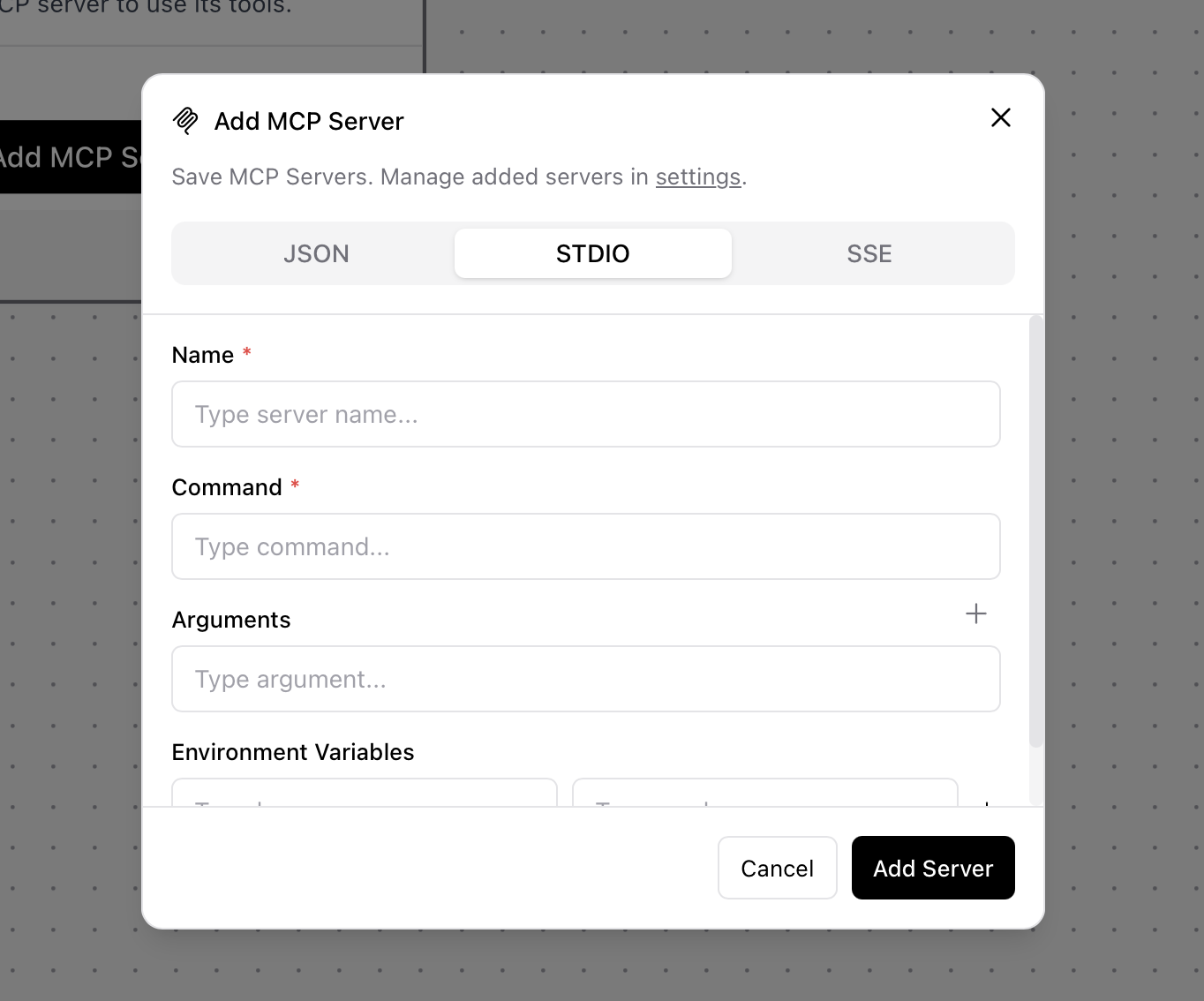
Replace <your-api-key> with your actual Membit API key. Keep this credential secure and don’t share it with unauthorized users.
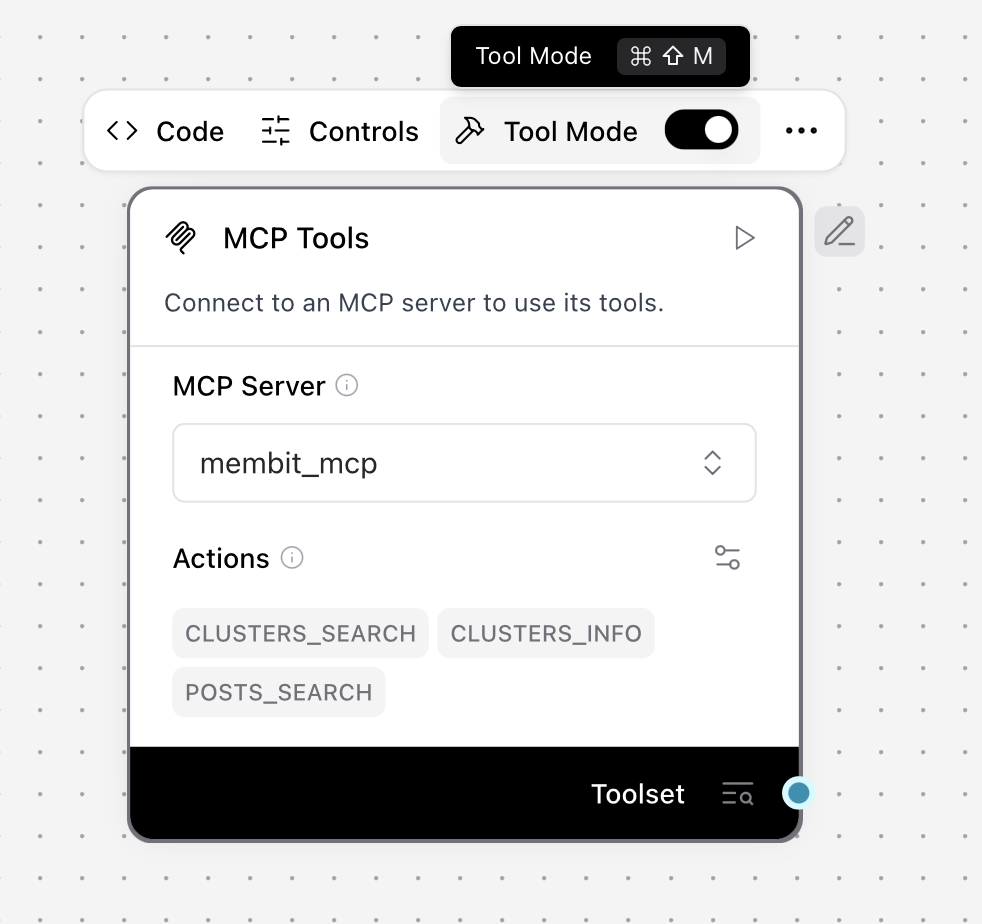
Click Add Server to save the configuration
Click Toggle Tool Mode to enable the MCP tools
Building Your First Workflow
Now let’s create a complete workflow that uses Membit’s real-time context:
1
Add Agent Component
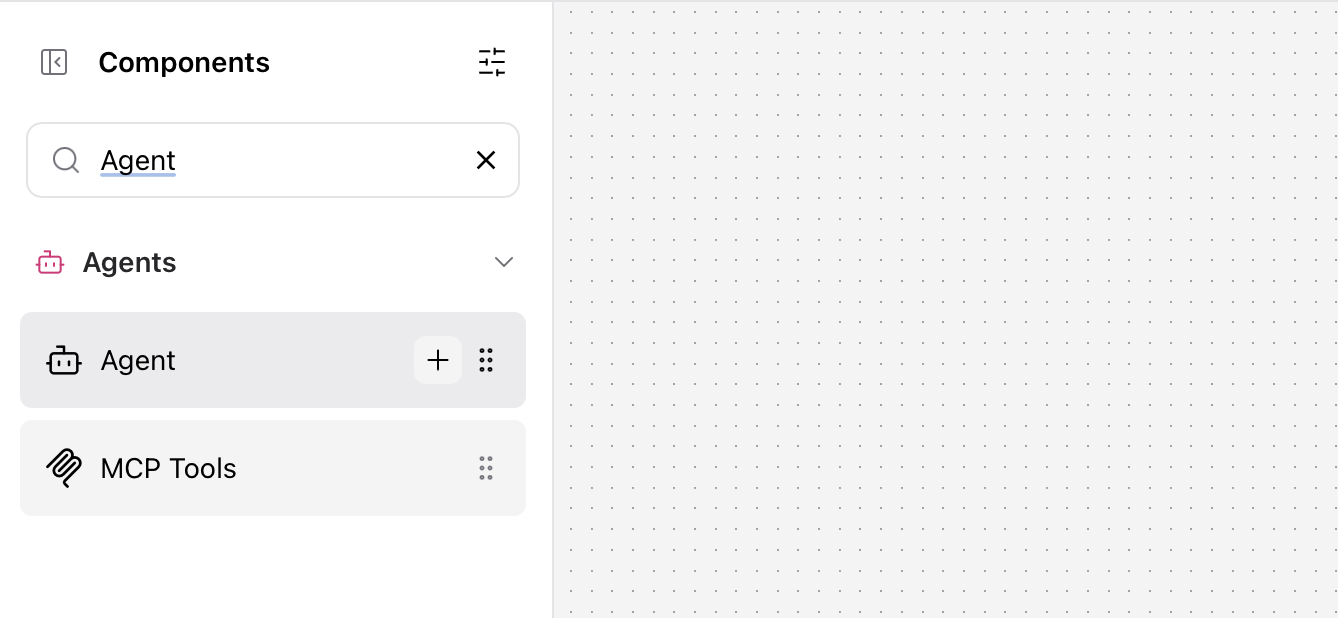
Search for “agent” in the component library and click Add to add an Agent component to your workflow.
The Agent component acts as the orchestrator, managing how your workflow processes requests and coordinates responses.
2
Configure Agent Model
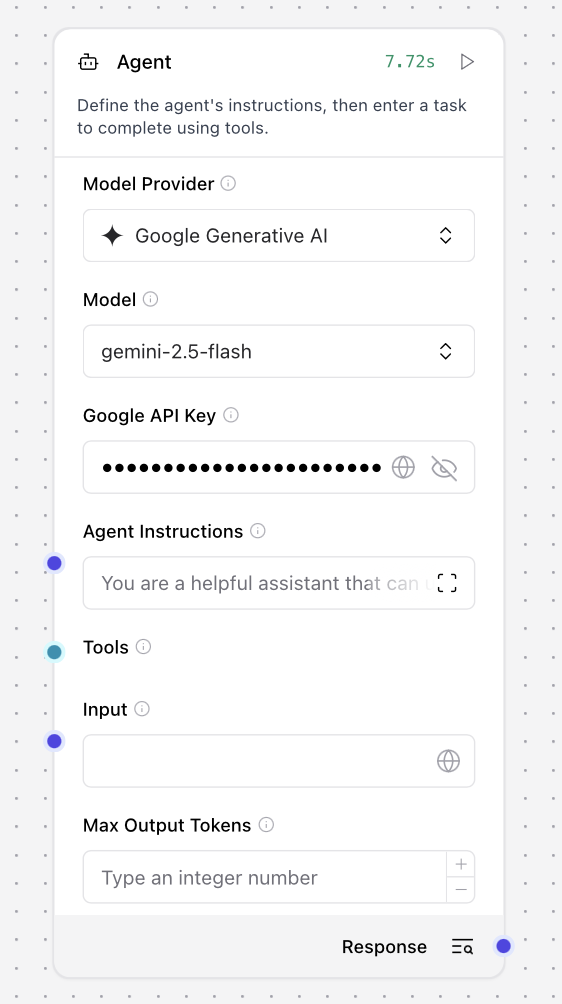
Configure the Agent component with your preferred language model:
Model Provider: Select “Gemini 2.5 Flash” (or your preferred model)
API Key: Set your Google AI Studio API key
You can use other model providers like OpenAI, Anthropic, or local models depending on your preference and requirements.
3
Connect MCP Tools
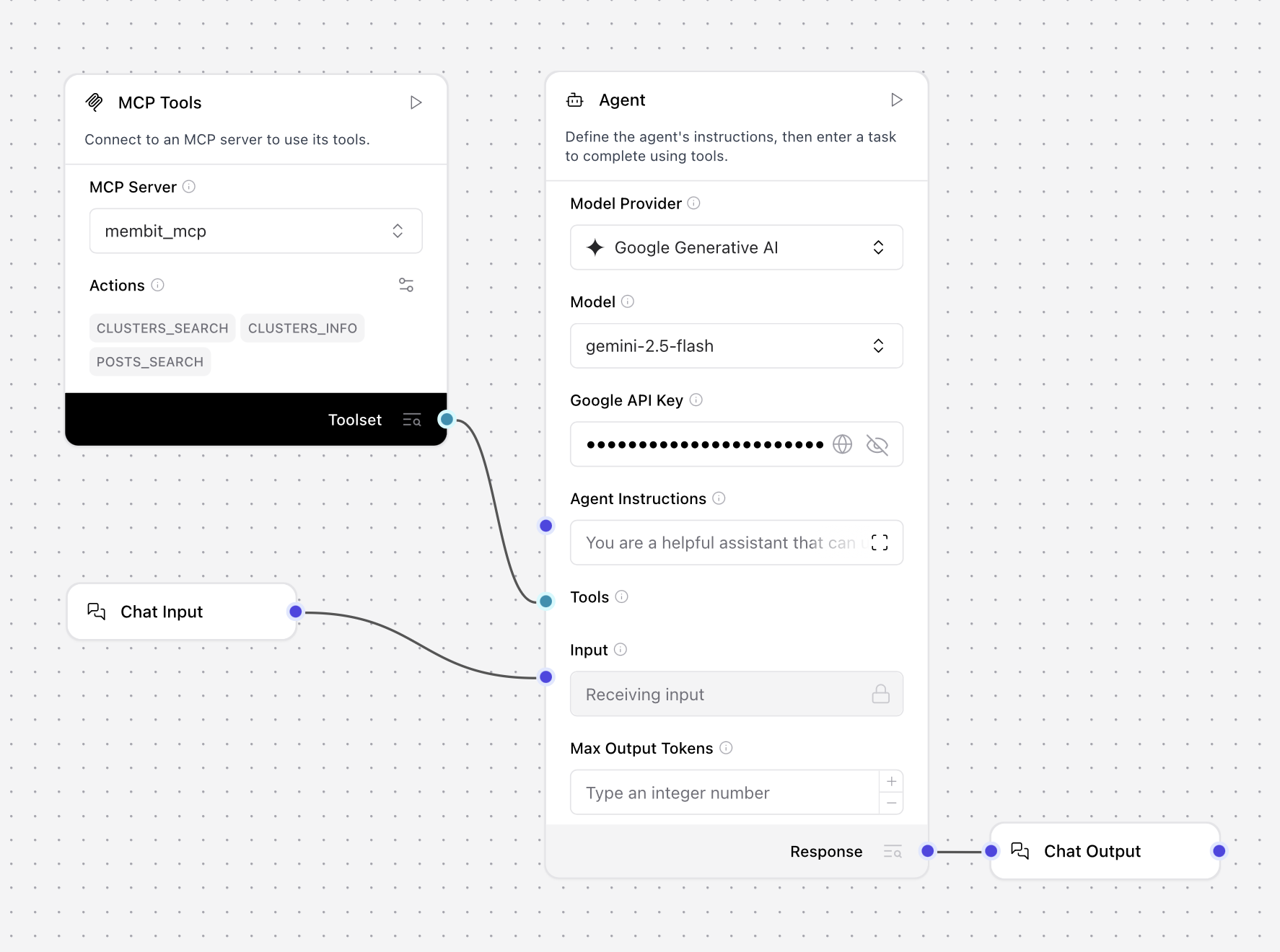
Connect the Membit MCP component to the Agent Tools input to provide real-time context capabilities.
This connection enables your agent to access Membit’s real-time social media context when processing user queries.
4
Add Chat Components
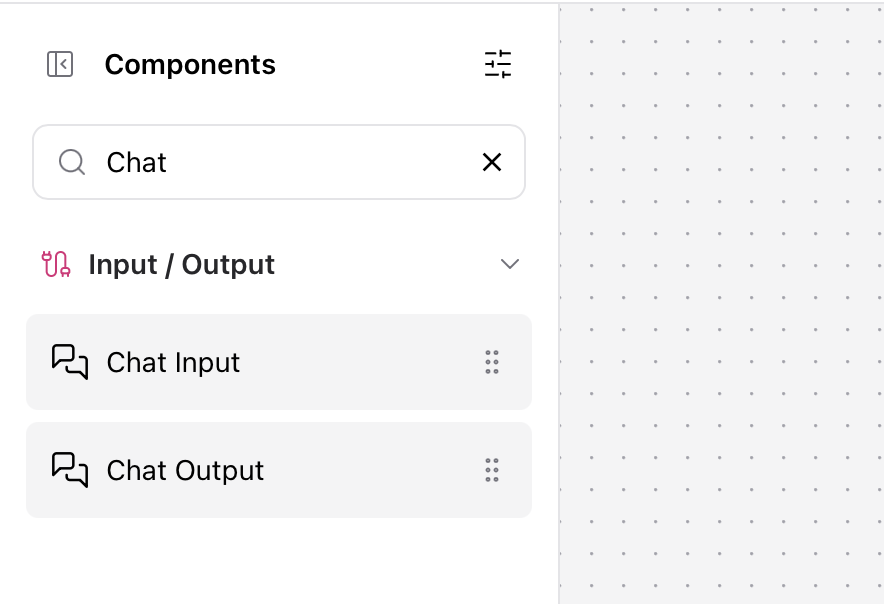
Add Chat Input and Chat Output components to create an interactive interface:
Chat Input - To receive user messages
Chat Output - To display agent responses
Connection Pattern:
Chat Input → Agent Input
Agent Response → Chat Output
5
Test Your Workflow
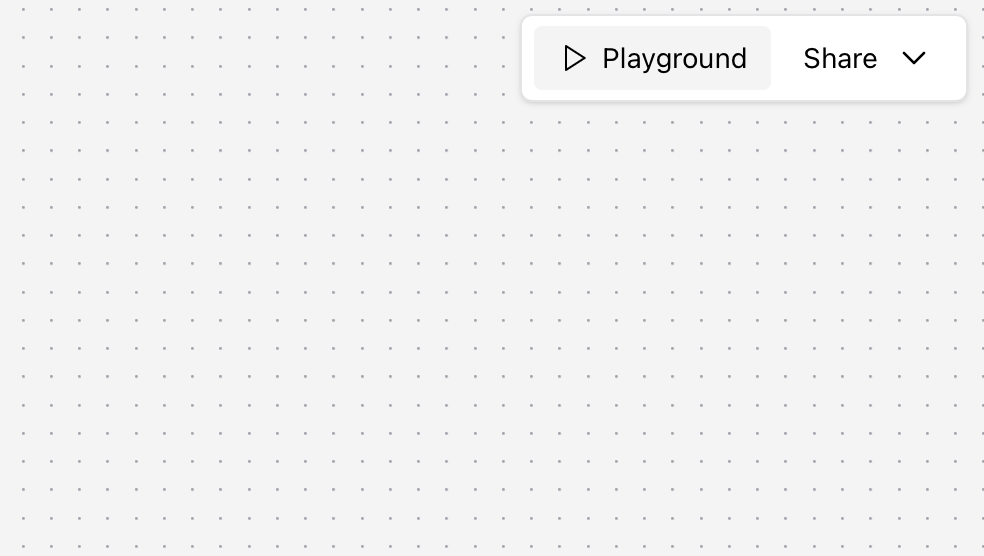
Click Playground to test your workflow with real-time context from Membit.
Try asking questions like:
“Tell me about crypto trends”
“What’s happening in AI today?”
“Give me the latest tech news”
Testing the workflow with real-time context from Membit
If successful, your agent will respond with current information about your query topic, powered by Membit’s real-time data feed.
Troubleshooting
MCP Server STDIO Connection Issues
Problem: Cannot establish STDIO connection to Membit MCP serverSolutions:Verify mcp-remote is available: run npx mcp-remote --version in terminalCheck the command format: npx -y mcp-remote https://mcp.membit.ai/mcpEnsure Node.js is properly installed and accessible to LangflowVerify environment variable MEMBIT_API_KEY is set correctlyTry restarting Langflow after configuration changes
Tool Mode Not Working
Problem: MCP tools don’t appear or aren’t accessibleSolutions:Ensure “Toggle Tool Mode” is enabled after server configurationVerify the MCP server status shows as “Connected”Check server logs for connection errors or authentication failuresTry removing and re-adding the MCP server configurationConfirm all arguments are in correct order: --header then X-Membit-Api-Key:${MEMBIT_API_KEY}
Agent Not Using Tools
Problem: Agent doesn’t utilize Membit tools in responsesSolutions:Ensure MCP Tools component is properly connected to Agent Tools inputTry more explicit prompts: “Use the available tools to search for…”Verify the chat model supports tool/function calling (Gemini 2.5 Flash recommended)Check if the agent has proper system instructions about tool usageTest with simpler, more direct questions about current events
Workflow Component Connection Errors
Problem: Components won’t connect or show connection errorsSolutions:Verify component types match: Agent expects Tools input, not generic componentsCheck that all required inputs are connected (Chat Input → Agent, Model → Agent)Ensure MCP Tools output is properly mapped to Agent Tools inputTry reconnecting components in the correct orderRestart the workflow and test connections step by step
⌘I
{"docsConfig":{"theme":"maple","$schema":"https://mintlify.com/docs.json","name":"Membit","colors":{"primary":"#6b6bff","light":"#8f8fff","dark":"#5050ff"},"logo":{"light":"https://mintcdn.com/membit/X3g2jASQcla7cFkX/logo/light.svg?fit=max\u0026auto=format\u0026n=X3g2jASQcla7cFkX\u0026q=85\u0026s=073455a05d026924fc23c45cbfa39fe5","dark":"https://mintcdn.com/membit/X3g2jASQcla7cFkX/logo/dark.svg?fit=max\u0026auto=format\u0026n=X3g2jASQcla7cFkX\u0026q=85\u0026s=ca8210f869368ced1a731ea54d4cfec8"},"favicon":"https://mintcdn.com/membit/4JB7OCBLDkpjkRT-/favicon.svg?fit=max\u0026auto=format\u0026n=4JB7OCBLDkpjkRT-\u0026q=85\u0026s=7148cf6afb358d781c9091fef781b848","appearance":{"default":"light","strict":true},"navbar":{"links":[{"href":"https://discord.bandprotocol.com","label":"Discord"}],"primary":{"type":"button","label":"Official Website","href":"https://membit.ai"}},"footer":{"socials":{"x":"https://x.com/membit_ai","github":"https://github.com/bandprotocol"}},"integrations":{"ga4":{"measurementId":"G-D0M7MLWDM2"}},"styling":{"latex":false},"navigation":{"pages":[]}},"deployment":{"deploymentMetadataValue":{"subdomain":"membit","hasAudioNarration":false,"actualSubdomain":"membit","customDomains":["docs.membit.ai"],"gitSource":{"type":"github","owner":"bandprotocol","repo":"membit-docs","deployBranch":"main","contentDirectory":"","isPrivate":true,"mountPath":"","label":""},"entitlements":{},"buildId":"6ae92ba07a537ee82203f242:success","clientVersion":"0.0.4205","searchFilterCounts":[{"language":"default","tag":"Get Started","count":6},{"language":"default","tag":"API Usage","count":6},{"language":"default","tag":"Usage with No-Code AI Agents","count":6},{"language":"default","tag":"Data Hunters","count":5},{"language":"default","tag":"Usage with Python Agents","count":4},{"language":"default","tag":"REST API","count":3},{"language":"default","tag":"API Reference","count":3},{"language":"default","tag":"Usage with Typescript Agents","count":2}]},"assistantConfig":{},"basePath":"","hasChatPermissions":false,"hasWebMcpPermissions":false,"toggles":[],"googleFontsInlined":false},"customCss":[],"page":{"pagePath":"integrations/no-code-agent-frameworks/langflow","slug":"/integrations/no-code-agent-frameworks/langflow","pageMetadata":{"title":"Langflow","description":"Integrate real-time context to your LangFlow AI workflows via Membit MCP.","icon":"); mask-image: url('/images/icons/langflow.svg'); mask-size: 100% 100%;/*","href":"/integrations/no-code-agent-frameworks/langflow"},"description":{"compiledSource":"\"use strict\";\nconst {jsx: _jsx} = arguments[0];\nconst {useMDXComponents: _provideComponents} = arguments[0];\nfunction _createMdxContent(props) {\n const _components = {\n p: \"p\",\n ..._provideComponents(),\n ...props.components\n };\n return _jsx(_components.p, {\n children: \"Integrate real-time context to your LangFlow AI workflows via Membit MCP.\"\n });\n}\nfunction MDXContent(props = {}) {\n const {wrapper: MDXLayout} = {\n ..._provideComponents(),\n ...props.components\n };\n return MDXLayout ? _jsx(MDXLayout, {\n ...props,\n children: _jsx(_createMdxContent, {\n ...props\n })\n }) : _createMdxContent(props);\n}\nreturn {\n default: MDXContent\n};\n","frontmatter":{},"scope":{}},"pageType":"default","mdx":{"mdxSource":{"compiledSource":"\"use strict\";const{Fragment:_Fragment,jsx:_jsx,jsxs:_jsxs}=arguments[0];const{useMDXComponents:_provideComponents}=arguments[0];function _createMdxContent(props){const _components={a:`a`,code:`code`,li:`li`,ol:`ol`,p:`p`,strong:`strong`,ul:`ul`,..._provideComponents(),...props.components},{Accordion,AccordionGroup,Check,Frame,Heading,OptimizedImage,Step,Steps,Tip,Warning}=_components;if(!Accordion)_missingMdxReference(`Accordion`,true);if(!AccordionGroup)_missingMdxReference(`AccordionGroup`,true);if(!Check)_missingMdxReference(`Check`,true);if(!Frame)_missingMdxReference(`Frame`,true);if(!Heading)_missingMdxReference(`Heading`,true);if(!OptimizedImage)_missingMdxReference(`OptimizedImage`,true);if(!Step)_missingMdxReference(`Step`,true);if(!Steps)_missingMdxReference(`Steps`,true);if(!Tip)_missingMdxReference(`Tip`,true);if(!Warning)_missingMdxReference(`Warning`,true);return _jsxs(_Fragment,{children:[_jsx(`img`,{src:`https://mintcdn.com/membit/4JB7OCBLDkpjkRT-/images/cover/langflow.png?fit=max\u0026auto=format\u0026n=4JB7OCBLDkpjkRT-\u0026q=85\u0026s=07a84f60c7d0c59a8717ecabfa797a8e`,alt:`Cover Image`,className:`mint-rounded-lg`,noZoom:true,\"data-og-width\":`1402`,width:`1402`,\"data-og-height\":`463`,height:`463`,\"data-path\":`images/cover/langflow.png`,\"data-optimize\":`true`,\"data-opv\":`3`,srcset:`https://mintcdn.com/membit/4JB7OCBLDkpjkRT-/images/cover/langflow.png?w=280\u0026fit=max\u0026auto=format\u0026n=4JB7OCBLDkpjkRT-\u0026q=85\u0026s=ee9fff3ca8750462d612909532411c4b 280w, https://mintcdn.com/membit/4JB7OCBLDkpjkRT-/images/cover/langflow.png?w=560\u0026fit=max\u0026auto=format\u0026n=4JB7OCBLDkpjkRT-\u0026q=85\u0026s=f73cf125be8c6156fab6d99442e99668 560w, https://mintcdn.com/membit/4JB7OCBLDkpjkRT-/images/cover/langflow.png?w=840\u0026fit=max\u0026auto=format\u0026n=4JB7OCBLDkpjkRT-\u0026q=85\u0026s=9f75055a671a535ded915ad083a4dcf0 840w, https://mintcdn.com/membit/4JB7OCBLDkpjkRT-/images/cover/langflow.png?w=1100\u0026fit=max\u0026auto=format\u0026n=4JB7OCBLDkpjkRT-\u0026q=85\u0026s=997bacf00f9173a261b6eef57f57daf0 1100w, https://mintcdn.com/membit/4JB7OCBLDkpjkRT-/images/cover/langflow.png?w=1650\u0026fit=max\u0026auto=format\u0026n=4JB7OCBLDkpjkRT-\u0026q=85\u0026s=729e2b8ff3e527a3bae6b3b0322f5b78 1650w, https://mintcdn.com/membit/4JB7OCBLDkpjkRT-/images/cover/langflow.png?w=2500\u0026fit=max\u0026auto=format\u0026n=4JB7OCBLDkpjkRT-\u0026q=85\u0026s=b0f202695d98df65191c31056b9e87b3 2500w`}),`\n`,_jsx(_components.p,{children:`Langflow is a visual framework for building multi-agent and RAG applications using a drag-and-drop interface. By integrating Membit with Langflow, you can enhance your AI agents with real-time social context, enabling them to access current trends, breaking news, and live conversations from across the web through a node-based visual workflow.`}),`\n`,_jsx(Heading,{level:`2`,id:`prerequisites`,children:`Prerequisites`}),`\n`,_jsx(_components.p,{children:`Before you begin, make sure you have:`}),`\n`,_jsxs(_components.ul,{children:[`\n`,_jsxs(_components.li,{children:[`Langflow application installed (`,_jsx(_components.a,{href:`https://langflow.org`,children:`download here`}),`)`]}),`\n`,_jsxs(_components.li,{children:[`A Membit account with an API key `,_jsx(_components.a,{href:`/access-and-auth`,children:`get your API key`})]}),`\n`,_jsx(_components.li,{children:`Basic familiarity with Langflow’s visual workflow builder`}),`\n`,_jsx(_components.li,{children:`A Google AI Studio API key for the chat model (optional)`}),`\n`]}),`\n`,_jsx(Heading,{level:`2`,id:`setting-up-membit-mcp-tools`,children:`Setting Up Membit MCP Tools`}),`\n`,_jsx(_components.p,{children:`Follow these steps to integrate Membit with your Langflow workflows:`}),`\n`,_jsxs(Steps,{children:[_jsxs(Step,{title:`Create New Flow`,children:[_jsxs(_components.p,{children:[`Open the Langflow application and click `,_jsx(_components.strong,{children:`Add New Flow`}),` to start building a new workflow.`]}),_jsx(Frame,{children:_jsx(OptimizedImage,{src:`https://mintcdn.com/membit/X3g2jASQcla7cFkX/images/langflow/new-flow.png?fit=max\u0026auto=format\u0026n=X3g2jASQcla7cFkX\u0026q=85\u0026s=c7a2c52aecee8b272fbf738abccede9d`,alt:`Langflow main interface with add new flow button`,\"data-og-width\":`1362`,width:`1362`,\"data-og-height\":`704`,height:`704`,\"data-path\":`images/langflow/new-flow.png`,\"data-optimize\":`true`,\"data-opv\":`3`,srcset:`https://mintcdn.com/membit/X3g2jASQcla7cFkX/images/langflow/new-flow.png?w=280\u0026fit=max\u0026auto=format\u0026n=X3g2jASQcla7cFkX\u0026q=85\u0026s=ced5d0c7ef4edf44702233d5a3b41ab4 280w, https://mintcdn.com/membit/X3g2jASQcla7cFkX/images/langflow/new-flow.png?w=560\u0026fit=max\u0026auto=format\u0026n=X3g2jASQcla7cFkX\u0026q=85\u0026s=290c8984d7e6cd7b268e756bc5936e29 560w, https://mintcdn.com/membit/X3g2jASQcla7cFkX/images/langflow/new-flow.png?w=840\u0026fit=max\u0026auto=format\u0026n=X3g2jASQcla7cFkX\u0026q=85\u0026s=393d797d4fb22cf90e88d1543b1bd604 840w, https://mintcdn.com/membit/X3g2jASQcla7cFkX/images/langflow/new-flow.png?w=1100\u0026fit=max\u0026auto=format\u0026n=X3g2jASQcla7cFkX\u0026q=85\u0026s=fed318a562ad1064e0e028be4b1f0fe1 1100w, https://mintcdn.com/membit/X3g2jASQcla7cFkX/images/langflow/new-flow.png?w=1650\u0026fit=max\u0026auto=format\u0026n=X3g2jASQcla7cFkX\u0026q=85\u0026s=ee4907f019ca436a2d59a2c46febd9d7 1650w, https://mintcdn.com/membit/X3g2jASQcla7cFkX/images/langflow/new-flow.png?w=2500\u0026fit=max\u0026auto=format\u0026n=X3g2jASQcla7cFkX\u0026q=85\u0026s=9cd7ab7c504463adb8bbf117edaf7ee2 2500w`})})]}),_jsxs(Step,{title:`Select Blank Flow`,children:[_jsxs(_components.p,{children:[`Choose `,_jsx(_components.strong,{children:`Blank Flow`}),` to start with a clean workspace where you can build your custom workflow.`]}),_jsx(Frame,{children:_jsx(OptimizedImage,{src:`https://mintcdn.com/membit/X3g2jASQcla7cFkX/images/langflow/blank-flow.png?fit=max\u0026auto=format\u0026n=X3g2jASQcla7cFkX\u0026q=85\u0026s=30a96bcfc223e5f9f1fb0c9cb50f3755`,alt:`Langflow template selection showing blank flow option`,\"data-og-width\":`2550`,width:`2550`,\"data-og-height\":`1606`,height:`1606`,\"data-path\":`images/langflow/blank-flow.png`,\"data-optimize\":`true`,\"data-opv\":`3`,srcset:`https://mintcdn.com/membit/X3g2jASQcla7cFkX/images/langflow/blank-flow.png?w=280\u0026fit=max\u0026auto=format\u0026n=X3g2jASQcla7cFkX\u0026q=85\u0026s=ce353e16eac1beb2a403b203b95c0830 280w, https://mintcdn.com/membit/X3g2jASQcla7cFkX/images/langflow/blank-flow.png?w=560\u0026fit=max\u0026auto=format\u0026n=X3g2jASQcla7cFkX\u0026q=85\u0026s=8dffe343a249fae00b8b1e9767c40f8f 560w, https://mintcdn.com/membit/X3g2jASQcla7cFkX/images/langflow/blank-flow.png?w=840\u0026fit=max\u0026auto=format\u0026n=X3g2jASQcla7cFkX\u0026q=85\u0026s=422046c1ad896759cb7e9f146784ed66 840w, https://mintcdn.com/membit/X3g2jASQcla7cFkX/images/langflow/blank-flow.png?w=1100\u0026fit=max\u0026auto=format\u0026n=X3g2jASQcla7cFkX\u0026q=85\u0026s=4d0e4c801881676f3f131ce23d507ce7 1100w, https://mintcdn.com/membit/X3g2jASQcla7cFkX/images/langflow/blank-flow.png?w=1650\u0026fit=max\u0026auto=format\u0026n=X3g2jASQcla7cFkX\u0026q=85\u0026s=66aace0117d8daf0ee3e0b8b987bd895 1650w, https://mintcdn.com/membit/X3g2jASQcla7cFkX/images/langflow/blank-flow.png?w=2500\u0026fit=max\u0026auto=format\u0026n=X3g2jASQcla7cFkX\u0026q=85\u0026s=1d162e6d59f8e92cdc8ee68e4bf505d9 2500w`})})]}),_jsxs(Step,{title:`Search for MCP Tools`,children:[_jsx(_components.p,{children:`In the component search bar, type “MCP tools” to find the Model Context Protocol integration component.`}),_jsx(Frame,{children:_jsx(OptimizedImage,{src:`https://mintcdn.com/membit/X3g2jASQcla7cFkX/images/langflow/search-mcp-tools.png?fit=max\u0026auto=format\u0026n=X3g2jASQcla7cFkX\u0026q=85\u0026s=3cc7bb9dd4f7b3ae29d04c0fc7176117`,alt:`Searching for MCP tools in Langflow component library`,\"data-og-width\":`1562`,width:`1562`,\"data-og-height\":`862`,height:`862`,\"data-path\":`images/langflow/search-mcp-tools.png`,\"data-optimize\":`true`,\"data-opv\":`3`,srcset:`https://mintcdn.com/membit/X3g2jASQcla7cFkX/images/langflow/search-mcp-tools.png?w=280\u0026fit=max\u0026auto=format\u0026n=X3g2jASQcla7cFkX\u0026q=85\u0026s=a25a337ec964a5b876c1da4879e4415f 280w, https://mintcdn.com/membit/X3g2jASQcla7cFkX/images/langflow/search-mcp-tools.png?w=560\u0026fit=max\u0026auto=format\u0026n=X3g2jASQcla7cFkX\u0026q=85\u0026s=36ae09eefba4b47c77f324b596a2245c 560w, https://mintcdn.com/membit/X3g2jASQcla7cFkX/images/langflow/search-mcp-tools.png?w=840\u0026fit=max\u0026auto=format\u0026n=X3g2jASQcla7cFkX\u0026q=85\u0026s=90ecbdb6f03f71f2ad97f6d11324c77f 840w, https://mintcdn.com/membit/X3g2jASQcla7cFkX/images/langflow/search-mcp-tools.png?w=1100\u0026fit=max\u0026auto=format\u0026n=X3g2jASQcla7cFkX\u0026q=85\u0026s=fa541544cc350d43beef93c40e637731 1100w, https://mintcdn.com/membit/X3g2jASQcla7cFkX/images/langflow/search-mcp-tools.png?w=1650\u0026fit=max\u0026auto=format\u0026n=X3g2jASQcla7cFkX\u0026q=85\u0026s=5adf7e3ce8e679c0f3905afe35b744e2 1650w, https://mintcdn.com/membit/X3g2jASQcla7cFkX/images/langflow/search-mcp-tools.png?w=2500\u0026fit=max\u0026auto=format\u0026n=X3g2jASQcla7cFkX\u0026q=85\u0026s=e5ecff61c209aa72d43f2d1a8f87345e 2500w`})}),_jsx(Check,{children:_jsx(_components.p,{children:`The MCP Tools component enables Langflow to connect with external MCP servers like Membit, providing real-time context to your workflows.`})})]}),_jsxs(Step,{title:`Configure MCP Server`,children:[_jsx(_components.p,{children:`Configure the MCP Tools component by adding a new MCP server:`}),_jsxs(_components.ol,{children:[`\n`,_jsxs(_components.li,{children:[`Click `,_jsx(_components.strong,{children:`Add MCP Server`})]}),`\n`,_jsxs(_components.li,{children:[`Select `,_jsx(_components.strong,{children:`STDIO`}),` as the connection type`]}),`\n`]}),_jsx(Frame,{children:_jsx(OptimizedImage,{src:`https://mintcdn.com/membit/X3g2jASQcla7cFkX/images/langflow/stdio.png?fit=max\u0026auto=format\u0026n=X3g2jASQcla7cFkX\u0026q=85\u0026s=7db4ac4fb168aaf7063c2c895cae0771`,alt:`MCP server configuration interface showing STDIO option`,\"data-og-width\":`1364`,width:`1364`,\"data-og-height\":`1134`,height:`1134`,\"data-path\":`images/langflow/stdio.png`,\"data-optimize\":`true`,\"data-opv\":`3`,srcset:`https://mintcdn.com/membit/X3g2jASQcla7cFkX/images/langflow/stdio.png?w=280\u0026fit=max\u0026auto=format\u0026n=X3g2jASQcla7cFkX\u0026q=85\u0026s=bb1fc881985ea71594401e5af8fa1dc1 280w, https://mintcdn.com/membit/X3g2jASQcla7cFkX/images/langflow/stdio.png?w=560\u0026fit=max\u0026auto=format\u0026n=X3g2jASQcla7cFkX\u0026q=85\u0026s=4533a0409109984c24cbfe50ef28ef2d 560w, https://mintcdn.com/membit/X3g2jASQcla7cFkX/images/langflow/stdio.png?w=840\u0026fit=max\u0026auto=format\u0026n=X3g2jASQcla7cFkX\u0026q=85\u0026s=536e3c824d84a44e6558c31ffd14c059 840w, https://mintcdn.com/membit/X3g2jASQcla7cFkX/images/langflow/stdio.png?w=1100\u0026fit=max\u0026auto=format\u0026n=X3g2jASQcla7cFkX\u0026q=85\u0026s=54b4917dd1cde1533667b3d4374b7f40 1100w, https://mintcdn.com/membit/X3g2jASQcla7cFkX/images/langflow/stdio.png?w=1650\u0026fit=max\u0026auto=format\u0026n=X3g2jASQcla7cFkX\u0026q=85\u0026s=c89079a06387bb969f5b57b60472dcef 1650w, https://mintcdn.com/membit/X3g2jASQcla7cFkX/images/langflow/stdio.png?w=2500\u0026fit=max\u0026auto=format\u0026n=X3g2jASQcla7cFkX\u0026q=85\u0026s=47ad393f8c6ce5f898bf8832fc964f92 2500w`})}),_jsx(_components.p,{children:_jsx(_components.strong,{children:`STDIO Configuration:`})}),_jsxs(_components.ul,{children:[`\n`,_jsxs(_components.li,{children:[_jsx(_components.strong,{children:`Name`}),`: `,_jsx(_components.code,{children:`membit-mcp`})]}),`\n`,_jsxs(_components.li,{children:[_jsx(_components.strong,{children:`Command`}),`: `,_jsx(_components.code,{children:`npx -y mcp-remote https://mcp.membit.ai/mcp`})]}),`\n`,_jsxs(_components.li,{children:[_jsx(_components.strong,{children:`Argument 1`}),`: `,_jsx(_components.code,{children:`--header`})]}),`\n`,_jsxs(_components.li,{children:[_jsx(_components.strong,{children:`Argument 2`}),`: `,_jsx(_components.code,{children:\"X-Membit-Api-Key:${MEMBIT_API_KEY}\"})]}),`\n`,_jsxs(_components.li,{children:[_jsx(_components.strong,{children:`Environment Variables`}),`: `,_jsx(_components.code,{children:`MEMBIT_API_KEY \u003cyour-api-key>`})]}),`\n`]}),_jsx(Warning,{children:_jsxs(_components.p,{children:[`Replace `,_jsx(_components.code,{children:`\u003cyour-api-key>`}),` with your actual Membit API key. Keep this credential secure and don’t share it with unauthorized users.`]})}),_jsxs(_components.ol,{start:`3`,children:[`\n`,_jsxs(_components.li,{children:[`Click `,_jsx(_components.strong,{children:`Add Server`}),` to save the configuration`]}),`\n`,_jsxs(_components.li,{children:[`Click `,_jsx(_components.strong,{children:`Toggle Tool Mode`}),` to enable the MCP tools`]}),`\n`]}),_jsx(Frame,{children:_jsx(OptimizedImage,{src:`https://mintcdn.com/membit/X3g2jASQcla7cFkX/images/langflow/tool-mode.png?fit=max\u0026auto=format\u0026n=X3g2jASQcla7cFkX\u0026q=85\u0026s=e325900fd886c6a6333dee3b031838a6`,alt:`MCP tools configuration showing toggle tool mode option`,\"data-og-width\":`982`,width:`982`,\"data-og-height\":`924`,height:`924`,\"data-path\":`images/langflow/tool-mode.png`,\"data-optimize\":`true`,\"data-opv\":`3`,srcset:`https://mintcdn.com/membit/X3g2jASQcla7cFkX/images/langflow/tool-mode.png?w=280\u0026fit=max\u0026auto=format\u0026n=X3g2jASQcla7cFkX\u0026q=85\u0026s=07e3ac6727cebfeaa6c9384c0c0b40fe 280w, https://mintcdn.com/membit/X3g2jASQcla7cFkX/images/langflow/tool-mode.png?w=560\u0026fit=max\u0026auto=format\u0026n=X3g2jASQcla7cFkX\u0026q=85\u0026s=749abf7b6b74831f46e63fed362a98c5 560w, https://mintcdn.com/membit/X3g2jASQcla7cFkX/images/langflow/tool-mode.png?w=840\u0026fit=max\u0026auto=format\u0026n=X3g2jASQcla7cFkX\u0026q=85\u0026s=608fc6c72f8acdeac5ff88937bfa691c 840w, https://mintcdn.com/membit/X3g2jASQcla7cFkX/images/langflow/tool-mode.png?w=1100\u0026fit=max\u0026auto=format\u0026n=X3g2jASQcla7cFkX\u0026q=85\u0026s=aa72f4aaf10a0ffc79c8b74fa391a015 1100w, https://mintcdn.com/membit/X3g2jASQcla7cFkX/images/langflow/tool-mode.png?w=1650\u0026fit=max\u0026auto=format\u0026n=X3g2jASQcla7cFkX\u0026q=85\u0026s=65dbbba22afc1cebb1e0236c12540f73 1650w, https://mintcdn.com/membit/X3g2jASQcla7cFkX/images/langflow/tool-mode.png?w=2500\u0026fit=max\u0026auto=format\u0026n=X3g2jASQcla7cFkX\u0026q=85\u0026s=9e66fca171fbda08f66f95d18b76f4b2 2500w`})})]})]}),`\n`,_jsx(Heading,{level:`2`,id:`building-your-first-workflow`,children:`Building Your First Workflow`}),`\n`,_jsx(_components.p,{children:`Now let’s create a complete workflow that uses Membit’s real-time context:`}),`\n`,_jsxs(Steps,{children:[_jsxs(Step,{title:`Add Agent Component`,children:[_jsxs(_components.p,{children:[`Search for “agent” in the component library and click `,_jsx(_components.strong,{children:`Add`}),` to add an Agent component to your workflow.`]}),_jsx(Frame,{children:_jsx(OptimizedImage,{src:`https://mintcdn.com/membit/X3g2jASQcla7cFkX/images/langflow/agent.png?fit=max\u0026auto=format\u0026n=X3g2jASQcla7cFkX\u0026q=85\u0026s=51559a98c60b2abd94b763a2ff7e30b9`,alt:`Agent component in Langflow component library`,\"data-og-width\":`1338`,width:`1338`,\"data-og-height\":`618`,height:`618`,\"data-path\":`images/langflow/agent.png`,\"data-optimize\":`true`,\"data-opv\":`3`,srcset:`https://mintcdn.com/membit/X3g2jASQcla7cFkX/images/langflow/agent.png?w=280\u0026fit=max\u0026auto=format\u0026n=X3g2jASQcla7cFkX\u0026q=85\u0026s=660b4f49d36a59bb18a53ae1114f59d3 280w, https://mintcdn.com/membit/X3g2jASQcla7cFkX/images/langflow/agent.png?w=560\u0026fit=max\u0026auto=format\u0026n=X3g2jASQcla7cFkX\u0026q=85\u0026s=152023bc5fa9a4de990234cc7d67c174 560w, https://mintcdn.com/membit/X3g2jASQcla7cFkX/images/langflow/agent.png?w=840\u0026fit=max\u0026auto=format\u0026n=X3g2jASQcla7cFkX\u0026q=85\u0026s=4deb2345ea069e6b6eea9909a0b26f0d 840w, https://mintcdn.com/membit/X3g2jASQcla7cFkX/images/langflow/agent.png?w=1100\u0026fit=max\u0026auto=format\u0026n=X3g2jASQcla7cFkX\u0026q=85\u0026s=21cae6c61f456444d94070c788c2d405 1100w, https://mintcdn.com/membit/X3g2jASQcla7cFkX/images/langflow/agent.png?w=1650\u0026fit=max\u0026auto=format\u0026n=X3g2jASQcla7cFkX\u0026q=85\u0026s=09a81b93cfddc0a4f0df6d07b4f1bc79 1650w, https://mintcdn.com/membit/X3g2jASQcla7cFkX/images/langflow/agent.png?w=2500\u0026fit=max\u0026auto=format\u0026n=X3g2jASQcla7cFkX\u0026q=85\u0026s=80cda73fbd6ce91b09612f6cbb394313 2500w`})}),_jsx(Check,{children:_jsx(_components.p,{children:`The Agent component acts as the orchestrator, managing how your workflow processes requests and coordinates responses.`})})]}),_jsxs(Step,{title:`Configure Agent Model`,children:[_jsx(_components.p,{children:`Configure the Agent component with your preferred language model:`}),_jsx(Frame,{children:_jsx(OptimizedImage,{src:`https://mintcdn.com/membit/X3g2jASQcla7cFkX/images/langflow/config-agent.png?fit=max\u0026auto=format\u0026n=X3g2jASQcla7cFkX\u0026q=85\u0026s=90e660bcd921d8b7200eaa36b991024e`,alt:`Config agent component`,\"data-og-width\":`562`,width:`562`,\"data-og-height\":`1004`,height:`1004`,\"data-path\":`images/langflow/config-agent.png`,\"data-optimize\":`true`,\"data-opv\":`3`,srcset:`https://mintcdn.com/membit/X3g2jASQcla7cFkX/images/langflow/config-agent.png?w=280\u0026fit=max\u0026auto=format\u0026n=X3g2jASQcla7cFkX\u0026q=85\u0026s=396f6578979735f5035600279dc7b31f 280w, https://mintcdn.com/membit/X3g2jASQcla7cFkX/images/langflow/config-agent.png?w=560\u0026fit=max\u0026auto=format\u0026n=X3g2jASQcla7cFkX\u0026q=85\u0026s=28ae3063518c2973b1209492ff7af9c2 560w, https://mintcdn.com/membit/X3g2jASQcla7cFkX/images/langflow/config-agent.png?w=840\u0026fit=max\u0026auto=format\u0026n=X3g2jASQcla7cFkX\u0026q=85\u0026s=9cb259082418be34264a33d5b2c1b7a5 840w, https://mintcdn.com/membit/X3g2jASQcla7cFkX/images/langflow/config-agent.png?w=1100\u0026fit=max\u0026auto=format\u0026n=X3g2jASQcla7cFkX\u0026q=85\u0026s=2aabcf81053927295bcaf1474b01e03a 1100w, https://mintcdn.com/membit/X3g2jASQcla7cFkX/images/langflow/config-agent.png?w=1650\u0026fit=max\u0026auto=format\u0026n=X3g2jASQcla7cFkX\u0026q=85\u0026s=1d8d17807b1bf07bc8c699b800be96be 1650w, https://mintcdn.com/membit/X3g2jASQcla7cFkX/images/langflow/config-agent.png?w=2500\u0026fit=max\u0026auto=format\u0026n=X3g2jASQcla7cFkX\u0026q=85\u0026s=63c2958af8e814b2601f186f91ba1ab8 2500w`})}),_jsxs(_components.ul,{children:[`\n`,_jsxs(_components.li,{children:[_jsx(_components.strong,{children:`Model Provider`}),`: Select “Gemini 2.5 Flash” (or your preferred model)`]}),`\n`,_jsxs(_components.li,{children:[_jsx(_components.strong,{children:`API Key`}),`: Set your Google AI Studio API key`]}),`\n`]}),_jsx(Tip,{children:_jsx(_components.p,{children:`You can use other model providers like OpenAI, Anthropic, or local models depending on your preference and requirements.`})})]}),_jsxs(Step,{title:`Connect MCP Tools`,children:[_jsxs(_components.p,{children:[`Connect the `,_jsx(_components.strong,{children:`Membit MCP`}),` component to the `,_jsx(_components.strong,{children:`Agent Tools`}),` input to provide real-time context capabilities.`]}),_jsx(Check,{children:_jsx(_components.p,{children:`This connection enables your agent to access Membit’s real-time social media context when processing user queries.`})})]}),_jsxs(Step,{title:`Add Chat Components`,children:[_jsx(_components.p,{children:`Add Chat Input and Chat Output components to create an interactive interface:`}),_jsxs(_components.ol,{children:[`\n`,_jsxs(_components.li,{children:[_jsx(_components.strong,{children:`Chat Input`}),` - To receive user messages`]}),`\n`,_jsxs(_components.li,{children:[_jsx(_components.strong,{children:`Chat Output`}),` - To display agent responses`]}),`\n`]}),_jsx(Frame,{children:_jsx(OptimizedImage,{src:`https://mintcdn.com/membit/X3g2jASQcla7cFkX/images/langflow/chat.png?fit=max\u0026auto=format\u0026n=X3g2jASQcla7cFkX\u0026q=85\u0026s=e29630d4a41ed2d2b93414befee9735d`,alt:`Chat components in Langflow showing input and output nodes`,\"data-og-width\":`884`,width:`884`,\"data-og-height\":`604`,height:`604`,\"data-path\":`images/langflow/chat.png`,\"data-optimize\":`true`,\"data-opv\":`3`,srcset:`https://mintcdn.com/membit/X3g2jASQcla7cFkX/images/langflow/chat.png?w=280\u0026fit=max\u0026auto=format\u0026n=X3g2jASQcla7cFkX\u0026q=85\u0026s=e201893444115777905c5f8981781647 280w, https://mintcdn.com/membit/X3g2jASQcla7cFkX/images/langflow/chat.png?w=560\u0026fit=max\u0026auto=format\u0026n=X3g2jASQcla7cFkX\u0026q=85\u0026s=18f70672568b76cf584b4fe0d88c16fe 560w, https://mintcdn.com/membit/X3g2jASQcla7cFkX/images/langflow/chat.png?w=840\u0026fit=max\u0026auto=format\u0026n=X3g2jASQcla7cFkX\u0026q=85\u0026s=bc6860b39659bb8f560afa7ffcd95ff1 840w, https://mintcdn.com/membit/X3g2jASQcla7cFkX/images/langflow/chat.png?w=1100\u0026fit=max\u0026auto=format\u0026n=X3g2jASQcla7cFkX\u0026q=85\u0026s=1c35398cf9567167548b28c9980488fb 1100w, https://mintcdn.com/membit/X3g2jASQcla7cFkX/images/langflow/chat.png?w=1650\u0026fit=max\u0026auto=format\u0026n=X3g2jASQcla7cFkX\u0026q=85\u0026s=fed4080d74249062308554431d92bbc7 1650w, https://mintcdn.com/membit/X3g2jASQcla7cFkX/images/langflow/chat.png?w=2500\u0026fit=max\u0026auto=format\u0026n=X3g2jASQcla7cFkX\u0026q=85\u0026s=4f9291b0dacb0c74cbddff6a5d553d09 2500w`})}),_jsx(_components.p,{children:_jsx(_components.strong,{children:`Connection Pattern:`})}),_jsxs(_components.ul,{children:[`\n`,_jsxs(_components.li,{children:[_jsx(_components.strong,{children:`Chat Input`}),` → `,_jsx(_components.strong,{children:`Agent Input`})]}),`\n`,_jsxs(_components.li,{children:[_jsx(_components.strong,{children:`Agent Response`}),` → `,_jsx(_components.strong,{children:`Chat Output`})]}),`\n`]}),_jsx(Frame,{children:_jsx(OptimizedImage,{src:`https://mintcdn.com/membit/X3g2jASQcla7cFkX/images/langflow/chat-with-agent.png?fit=max\u0026auto=format\u0026n=X3g2jASQcla7cFkX\u0026q=85\u0026s=9353a0a092eecfde2f2c9243780937eb`,alt:`Complete Langflow workflow showing connected components`,\"data-og-width\":`1774`,width:`1774`,\"data-og-height\":`1320`,height:`1320`,\"data-path\":`images/langflow/chat-with-agent.png`,\"data-optimize\":`true`,\"data-opv\":`3`,srcset:`https://mintcdn.com/membit/X3g2jASQcla7cFkX/images/langflow/chat-with-agent.png?w=280\u0026fit=max\u0026auto=format\u0026n=X3g2jASQcla7cFkX\u0026q=85\u0026s=c5a7e2659290d95283780438c5409761 280w, https://mintcdn.com/membit/X3g2jASQcla7cFkX/images/langflow/chat-with-agent.png?w=560\u0026fit=max\u0026auto=format\u0026n=X3g2jASQcla7cFkX\u0026q=85\u0026s=ff0e67dbfaa82a67b373f3e5fa681959 560w, https://mintcdn.com/membit/X3g2jASQcla7cFkX/images/langflow/chat-with-agent.png?w=840\u0026fit=max\u0026auto=format\u0026n=X3g2jASQcla7cFkX\u0026q=85\u0026s=8bafb5a9f78662f34251192752b86f9c 840w, https://mintcdn.com/membit/X3g2jASQcla7cFkX/images/langflow/chat-with-agent.png?w=1100\u0026fit=max\u0026auto=format\u0026n=X3g2jASQcla7cFkX\u0026q=85\u0026s=79007d17f91564af8e883f4a9838aac0 1100w, https://mintcdn.com/membit/X3g2jASQcla7cFkX/images/langflow/chat-with-agent.png?w=1650\u0026fit=max\u0026auto=format\u0026n=X3g2jASQcla7cFkX\u0026q=85\u0026s=1090b0f15893522ea106d95004528349 1650w, https://mintcdn.com/membit/X3g2jASQcla7cFkX/images/langflow/chat-with-agent.png?w=2500\u0026fit=max\u0026auto=format\u0026n=X3g2jASQcla7cFkX\u0026q=85\u0026s=8e98251654f735ff64f4cbfe9f32cf26 2500w`})})]}),_jsxs(Step,{title:`Test Your Workflow`,children:[_jsxs(_components.p,{children:[`Click `,_jsx(_components.strong,{children:`Playground`}),` to test your workflow with real-time context from Membit.`]}),_jsx(Frame,{children:_jsx(OptimizedImage,{src:`https://mintcdn.com/membit/X3g2jASQcla7cFkX/images/langflow/playground.png?fit=max\u0026auto=format\u0026n=X3g2jASQcla7cFkX\u0026q=85\u0026s=9fc4a0fe96a08dc8e023ca6151346cc3`,alt:`Langflow playground interface for testing workflows`,\"data-og-width\":`984`,width:`984`,\"data-og-height\":`556`,height:`556`,\"data-path\":`images/langflow/playground.png`,\"data-optimize\":`true`,\"data-opv\":`3`,srcset:`https://mintcdn.com/membit/X3g2jASQcla7cFkX/images/langflow/playground.png?w=280\u0026fit=max\u0026auto=format\u0026n=X3g2jASQcla7cFkX\u0026q=85\u0026s=c243c818e24f464b840a723519df217b 280w, https://mintcdn.com/membit/X3g2jASQcla7cFkX/images/langflow/playground.png?w=560\u0026fit=max\u0026auto=format\u0026n=X3g2jASQcla7cFkX\u0026q=85\u0026s=bebca2ea3a9b215e1788997482142311 560w, https://mintcdn.com/membit/X3g2jASQcla7cFkX/images/langflow/playground.png?w=840\u0026fit=max\u0026auto=format\u0026n=X3g2jASQcla7cFkX\u0026q=85\u0026s=27d8587dbf5f971d5a64a49afa9d364e 840w, https://mintcdn.com/membit/X3g2jASQcla7cFkX/images/langflow/playground.png?w=1100\u0026fit=max\u0026auto=format\u0026n=X3g2jASQcla7cFkX\u0026q=85\u0026s=2ac55c9afdb284e8c99a16244371a2a8 1100w, https://mintcdn.com/membit/X3g2jASQcla7cFkX/images/langflow/playground.png?w=1650\u0026fit=max\u0026auto=format\u0026n=X3g2jASQcla7cFkX\u0026q=85\u0026s=6bc96bff9a613e9874c2c9f3310665a3 1650w, https://mintcdn.com/membit/X3g2jASQcla7cFkX/images/langflow/playground.png?w=2500\u0026fit=max\u0026auto=format\u0026n=X3g2jASQcla7cFkX\u0026q=85\u0026s=03e4c9b99889b8ffcc9e86280fb62289 2500w`})}),_jsx(_components.p,{children:`Try asking questions like:`}),_jsxs(_components.ul,{children:[`\n`,_jsx(_components.li,{children:`“Tell me about crypto trends”`}),`\n`,_jsx(_components.li,{children:`“What’s happening in AI today?”`}),`\n`,_jsx(_components.li,{children:`“Give me the latest tech news”`}),`\n`]}),_jsx(Frame,{caption:`Testing the workflow with real-time context from Membit`,children:_jsx(OptimizedImage,{src:`https://mintcdn.com/membit/X3g2jASQcla7cFkX/images/langflow/talk-with-chat.png?fit=max\u0026auto=format\u0026n=X3g2jASQcla7cFkX\u0026q=85\u0026s=c61bab880a59163b313138bc104a5199`,alt:`Langflow chat interface showing conversation with real-time context`,\"data-og-width\":`1610`,width:`1610`,\"data-og-height\":`1532`,height:`1532`,\"data-path\":`images/langflow/talk-with-chat.png`,\"data-optimize\":`true`,\"data-opv\":`3`,srcset:`https://mintcdn.com/membit/X3g2jASQcla7cFkX/images/langflow/talk-with-chat.png?w=280\u0026fit=max\u0026auto=format\u0026n=X3g2jASQcla7cFkX\u0026q=85\u0026s=49e9b5088576c5463737187356872e7e 280w, https://mintcdn.com/membit/X3g2jASQcla7cFkX/images/langflow/talk-with-chat.png?w=560\u0026fit=max\u0026auto=format\u0026n=X3g2jASQcla7cFkX\u0026q=85\u0026s=e6ccc9ada9ef71fa3fa6f69964317562 560w, https://mintcdn.com/membit/X3g2jASQcla7cFkX/images/langflow/talk-with-chat.png?w=840\u0026fit=max\u0026auto=format\u0026n=X3g2jASQcla7cFkX\u0026q=85\u0026s=42e7e3944edd1bfbba525a31a3324684 840w, https://mintcdn.com/membit/X3g2jASQcla7cFkX/images/langflow/talk-with-chat.png?w=1100\u0026fit=max\u0026auto=format\u0026n=X3g2jASQcla7cFkX\u0026q=85\u0026s=78952cadbb9bdf91d87f7d2c818589de 1100w, https://mintcdn.com/membit/X3g2jASQcla7cFkX/images/langflow/talk-with-chat.png?w=1650\u0026fit=max\u0026auto=format\u0026n=X3g2jASQcla7cFkX\u0026q=85\u0026s=fa6f646563b34580aecbf56b1786dfb9 1650w, https://mintcdn.com/membit/X3g2jASQcla7cFkX/images/langflow/talk-with-chat.png?w=2500\u0026fit=max\u0026auto=format\u0026n=X3g2jASQcla7cFkX\u0026q=85\u0026s=d0bbdb4b4ebe2d6b912f1a9c62d374ea 2500w`})}),_jsx(Check,{children:_jsx(_components.p,{children:`If successful, your agent will respond with current information about your query topic, powered by Membit’s real-time data feed.`})})]})]}),`\n`,_jsx(Heading,{level:`2`,id:`troubleshooting`,children:`Troubleshooting`}),`\n`,_jsxs(AccordionGroup,{children:[_jsxs(Accordion,{title:`MCP Server STDIO Connection Issues`,id:`mcp-server-stdio-connection-issues`,children:[_jsxs(_components.p,{children:[_jsx(_components.strong,{children:`Problem`}),`: Cannot establish STDIO connection to Membit MCP server`]}),_jsxs(_components.p,{children:[_jsx(_components.strong,{children:`Solutions`}),`:`]}),_jsxs(_components.p,{children:[`Verify `,_jsx(_components.code,{children:`mcp-remote`}),` is available: run `,_jsx(_components.code,{children:`npx mcp-remote --version`}),` in terminal`]}),_jsxs(_components.p,{children:[`Check the command format: `,_jsx(_components.code,{children:`npx -y mcp-remote https://mcp.membit.ai/mcp`})]}),_jsx(_components.p,{children:`Ensure Node.js is properly installed and accessible to Langflow`}),_jsxs(_components.p,{children:[`Verify environment variable `,_jsx(_components.code,{children:`MEMBIT_API_KEY`}),` is set correctly`]}),_jsx(_components.p,{children:`Try restarting Langflow after configuration changes`})]}),_jsxs(Accordion,{title:`Tool Mode Not Working`,id:`tool-mode-not-working`,children:[_jsxs(_components.p,{children:[_jsx(_components.strong,{children:`Problem`}),`: MCP tools don’t appear or aren’t accessible`]}),_jsxs(_components.p,{children:[_jsx(_components.strong,{children:`Solutions`}),`:`]}),_jsx(_components.p,{children:`Ensure “Toggle Tool Mode” is enabled after server configuration`}),_jsx(_components.p,{children:`Verify the MCP server status shows as “Connected”`}),_jsx(_components.p,{children:`Check server logs for connection errors or authentication failures`}),_jsx(_components.p,{children:`Try removing and re-adding the MCP server configuration`}),_jsxs(_components.p,{children:[`Confirm all arguments are in correct order: `,_jsx(_components.code,{children:`--header`}),` then `,_jsx(_components.code,{children:\"X-Membit-Api-Key:${MEMBIT_API_KEY}\"})]})]}),_jsxs(Accordion,{title:`Agent Not Using Tools`,id:`agent-not-using-tools`,children:[_jsxs(_components.p,{children:[_jsx(_components.strong,{children:`Problem`}),`: Agent doesn’t utilize Membit tools in responses`]}),_jsxs(_components.p,{children:[_jsx(_components.strong,{children:`Solutions`}),`:`]}),_jsx(_components.p,{children:`Ensure MCP Tools component is properly connected to Agent Tools input`}),_jsx(_components.p,{children:`Try more explicit prompts: “Use the available tools to search for…”`}),_jsx(_components.p,{children:`Verify the chat model supports tool/function calling (Gemini 2.5 Flash recommended)`}),_jsx(_components.p,{children:`Check if the agent has proper system instructions about tool usage`}),_jsx(_components.p,{children:`Test with simpler, more direct questions about current events`})]}),_jsxs(Accordion,{title:`Workflow Component Connection Errors`,id:`workflow-component-connection-errors`,children:[_jsxs(_components.p,{children:[_jsx(_components.strong,{children:`Problem`}),`: Components won’t connect or show connection errors`]}),_jsxs(_components.p,{children:[_jsx(_components.strong,{children:`Solutions`}),`:`]}),_jsx(_components.p,{children:`Verify component types match: Agent expects Tools input, not generic components`}),_jsx(_components.p,{children:`Check that all required inputs are connected (Chat Input → Agent, Model → Agent)`}),_jsx(_components.p,{children:`Ensure MCP Tools output is properly mapped to Agent Tools input`}),_jsx(_components.p,{children:`Try reconnecting components in the correct order`}),_jsx(_components.p,{children:`Restart the workflow and test connections step by step`})]})]})]})}function MDXContent(props={}){const{wrapper:MDXLayout}={..._provideComponents(),...props.components};return MDXLayout?_jsx(MDXLayout,{...props,children:_jsx(_createMdxContent,{...props})}):_createMdxContent(props)}return{default:MDXContent};function _missingMdxReference(id,component){throw new Error(`Expected `+(component?`component`:`object`)+\" `\"+id+\"` to be defined: you likely forgot to import, pass, or provide it.\")}","frontmatter":{},"scope":{"config":{},"pageMetadata":{"title":"Langflow","description":"Integrate real-time context to your LangFlow AI workflows via Membit MCP.","icon":"); mask-image: url('/images/icons/langflow.svg'); mask-size: 100% 100%;/*","href":"/integrations/no-code-agent-frameworks/langflow"}}},"mdxSourceWithNoJs":null},"mdxExtracts":{"tableOfContents":[{"title":"Prerequisites","slug":"prerequisites","depth":2,"children":[]},{"title":"Setting Up Membit MCP Tools","slug":"setting-up-membit-mcp-tools","depth":2,"children":[]},{"title":"Building Your First Workflow","slug":"building-your-first-workflow","depth":2,"children":[]},{"title":"Troubleshooting","slug":"troubleshooting","depth":2,"children":[]}],"codeExamples":{}},"jsLinks":[],"dynamicCss":".mint-rounded-lg {\n border-radius: 0.5rem\n}","subdomain":"membit","siteName":"Membit","title":"Langflow - Membit","navMaps":{"firstHrefInVersion":{},"firstHrefInLanguage":{}},"lastModified":"2026-01-07T10:01:52.861Z","originalFileLocation":"integrations/no-code-agent-frameworks/langflow.mdx"},"headHtml":"\u003cscript data-mint-head>(function(){var d=document.documentElement,p=\"light\";if(!p){try{p=localStorage.getItem(\"isDarkMode\")}catch(e){}if(p==='true')p='dark';else if(p==='false')p='light';if(p!=='light'\u0026\u0026p!=='dark'\u0026\u0026p!=='system')p=\"light\"}var r=p==='system'?(matchMedia(\"(prefers-color-scheme: dark)\").matches?'dark':'light'):p;d.classList.remove(r==='dark'?'light':'dark');d.classList.add(r);d.setAttribute(\"data-theme-preference\",p)})();\u003c/script>\u003cmeta data-mint-head name=\"description\" content=\"Integrate real-time context to your LangFlow AI workflows via Membit MCP.\">\u003cmeta data-mint-head name=\"application-name\" content=\"Membit\">\u003cmeta data-mint-head name=\"generator\" content=\"Mintlify\">\u003clink data-mint-head rel=\"icon\" type=\"image/png\" sizes=\"192x192\" href=\"/mintlify-assets/_mintlify/favicons/membit/t44AnaG2cSUdzgTj/_generated/favicon/android-chrome-192x192.png\" media=\"(prefers-color-scheme: light)\">\u003clink data-mint-head rel=\"apple-touch-icon\" type=\"image/png\" sizes=\"180x180\" href=\"/mintlify-assets/_mintlify/favicons/membit/t44AnaG2cSUdzgTj/_generated/favicon/apple-touch-icon.png\">\u003clink data-mint-head rel=\"icon\" type=\"image/png\" sizes=\"16x16\" href=\"/mintlify-assets/_mintlify/favicons/membit/t44AnaG2cSUdzgTj/_generated/favicon/favicon-16x16.png\" media=\"(prefers-color-scheme: light)\">\u003clink data-mint-head rel=\"icon\" type=\"image/png\" sizes=\"32x32\" href=\"/mintlify-assets/_mintlify/favicons/membit/t44AnaG2cSUdzgTj/_generated/favicon/favicon-32x32.png\" media=\"(prefers-color-scheme: light)\">\u003clink data-mint-head rel=\"shortcut icon\" type=\"image/x-icon\" href=\"/mintlify-assets/_mintlify/favicons/membit/t44AnaG2cSUdzgTj/_generated/favicon/favicon.ico\" media=\"(prefers-color-scheme: light)\">\u003clink data-mint-head rel=\"icon\" type=\"image/png\" sizes=\"192x192\" href=\"/mintlify-assets/_mintlify/favicons/membit/t44AnaG2cSUdzgTj/_generated/favicon-dark/android-chrome-192x192.png\" media=\"(prefers-color-scheme: dark)\">\u003clink data-mint-head rel=\"icon\" type=\"image/png\" sizes=\"16x16\" href=\"/mintlify-assets/_mintlify/favicons/membit/t44AnaG2cSUdzgTj/_generated/favicon-dark/favicon-16x16.png\" media=\"(prefers-color-scheme: dark)\">\u003clink data-mint-head rel=\"icon\" type=\"image/png\" sizes=\"32x32\" href=\"/mintlify-assets/_mintlify/favicons/membit/t44AnaG2cSUdzgTj/_generated/favicon-dark/favicon-32x32.png\" media=\"(prefers-color-scheme: dark)\">\u003clink data-mint-head rel=\"shortcut icon\" type=\"image/x-icon\" href=\"/mintlify-assets/_mintlify/favicons/membit/t44AnaG2cSUdzgTj/_generated/favicon-dark/favicon.ico\" media=\"(prefers-color-scheme: dark)\">\u003cmeta data-mint-head property=\"og:title\" content=\"Langflow - Membit\">\u003cmeta data-mint-head property=\"og:description\" content=\"Integrate real-time context to your LangFlow AI workflows via Membit MCP.\">\u003cmeta data-mint-head property=\"og:site_name\" content=\"Membit\">\u003cmeta data-mint-head property=\"og:url\" content=\"https://docs.membit.ai/integrations/no-code-agent-frameworks/langflow\">\u003cmeta data-mint-head property=\"og:type\" content=\"website\">\u003cmeta data-mint-head property=\"og:image\" content=\"https://membit.mintlify.site/_mintlify/api/og/v2?division=Usage+with+No-Code+AI+Agents\u0026amp;title=Langflow\u0026amp;description=Integrate+real-time+context+to+your+LangFlow+AI+workflows+via+Membit+MCP.\u0026amp;theme=bf8df9eb827cb54f2149bcae\u0026amp;signature=f7b565b4cc7fb6fda9b86b2cc500dd967bca0cbbe9b46fb399ea883098f4705a\">\u003cmeta data-mint-head property=\"og:image:width\" content=\"1200\">\u003cmeta data-mint-head property=\"og:image:height\" content=\"630\">\u003cmeta data-mint-head name=\"twitter:card\" content=\"summary_large_image\">\u003cmeta data-mint-head name=\"twitter:title\" content=\"Langflow - Membit\">\u003cmeta data-mint-head name=\"twitter:description\" content=\"Integrate real-time context to your LangFlow AI workflows via Membit MCP.\">\u003cmeta data-mint-head name=\"twitter:image\" content=\"https://membit.mintlify.site/_mintlify/api/og/v2?division=Usage+with+No-Code+AI+Agents\u0026amp;title=Langflow\u0026amp;description=Integrate+real-time+context+to+your+LangFlow+AI+workflows+via+Membit+MCP.\u0026amp;theme=bf8df9eb827cb54f2149bcae\u0026amp;signature=f7b565b4cc7fb6fda9b86b2cc500dd967bca0cbbe9b46fb399ea883098f4705a\">\u003cmeta data-mint-head name=\"twitter:image:width\" content=\"1200\">\u003cmeta data-mint-head name=\"twitter:image:height\" content=\"630\">\u003cmeta data-mint-head name=\"msapplication-config\" content=\"/mintlify-assets/_mintlify/favicons/membit/t44AnaG2cSUdzgTj/_generated/favicon/browserconfig.xml\">\u003cmeta data-mint-head name=\"apple-mobile-web-app-title\" content=\"Membit\">\u003cmeta data-mint-head name=\"msapplication-TileColor\" content=\"#6b6bff\">\u003clink data-mint-head rel=\"canonical\" href=\"https://docs.membit.ai/integrations/no-code-agent-frameworks/langflow\">\u003clink data-mint-head rel=\"alternate\" type=\"application/xml\" href=\"/sitemap.xml\">\u003clink data-mint-head rel=\"alternate\" type=\"text/markdown\" href=\"/integrations/no-code-agent-frameworks/langflow.md\">\u003cscript data-mint-head type=\"application/ld+json\">{\"@context\":\"https://schema.org\",\"@graph\":[{\"@type\":\"Organization\",\"@id\":\"https://docs.membit.ai/#organization\",\"name\":\"Membit\",\"url\":\"https://docs.membit.ai\",\"logo\":{\"@type\":\"ImageObject\",\"url\":\"https://mintcdn.com/membit/X3g2jASQcla7cFkX/logo/light.svg?fit=max\u0026auto=format\u0026n=X3g2jASQcla7cFkX\u0026q=85\u0026s=073455a05d026924fc23c45cbfa39fe5\"}},{\"@type\":\"WebSite\",\"@id\":\"https://docs.membit.ai#website\",\"name\":\"Membit\",\"url\":\"https://docs.membit.ai\",\"publisher\":{\"@id\":\"https://docs.membit.ai/#organization\"}},{\"@type\":\"WebPage\",\"@id\":\"https://docs.membit.ai/integrations/no-code-agent-frameworks/langflow#webpage\",\"url\":\"https://docs.membit.ai/integrations/no-code-agent-frameworks/langflow\",\"name\":\"Langflow\",\"description\":\"Integrate real-time context to your LangFlow AI workflows via Membit MCP.\",\"dateModified\":\"2026-01-07T10:01:52.861Z\",\"isPartOf\":{\"@id\":\"https://docs.membit.ai#website\"},\"breadcrumb\":{\"@id\":\"https://docs.membit.ai/integrations/no-code-agent-frameworks/langflow#breadcrumb\"}},{\"@type\":\"BreadcrumbList\",\"@id\":\"https://docs.membit.ai/integrations/no-code-agent-frameworks/langflow#breadcrumb\",\"itemListElement\":[{\"@type\":\"ListItem\",\"position\":1,\"name\":\"Usage with No-Code AI Agents\",\"item\":\"https://docs.membit.ai/integrations/no-code-agent-frameworks/n8n\"},{\"@type\":\"ListItem\",\"position\":2,\"name\":\"Langflow\",\"item\":\"https://docs.membit.ai/integrations/no-code-agent-frameworks/langflow\"}]},{\"@type\":[\"Article\",\"TechArticle\"],\"@id\":\"https://docs.membit.ai/integrations/no-code-agent-frameworks/langflow#article\",\"headline\":\"Langflow\",\"name\":\"Langflow\",\"description\":\"Integrate real-time context to your LangFlow AI workflows via Membit MCP.\",\"url\":\"https://docs.membit.ai/integrations/no-code-agent-frameworks/langflow\",\"mainEntityOfPage\":{\"@id\":\"https://docs.membit.ai/integrations/no-code-agent-frameworks/langflow#webpage\"},\"dateModified\":\"2026-01-07T10:01:52.861Z\",\"publisher\":{\"@id\":\"https://docs.membit.ai/#organization\"},\"isPartOf\":{\"@id\":\"https://docs.membit.ai#website\"}}]}\u003c/script>\u003cscript data-mint-head type=\"application/ld+json\">{\"@context\":\"https://schema.org\",\"@type\":\"WebSite\",\"name\":\"Membit\",\"publisher\":{\"@type\":\"Organization\",\"name\":\"Membit\"},\"provider\":{\"@type\":\"Organization\",\"name\":\"Mintlify\",\"url\":\"https://mintlify.com\"}}\u003c/script>","agentPointerHref":"/integrations/no-code-agent-frameworks/langflow.md","siteName":"Membit","nav":{"global":null,"groups":[{"group":"Get Started","pages":[{"title":"Welcome","icon":"hand-wave","href":"/index"},{"title":"How Membit Works","icon":"microchip","href":"/how-membit-works"},{"title":"Use Cases","icon":"lightbulb","href":"/use-cases"},{"title":"Access \u0026 Authentication","icon":"key","href":"/access-and-auth"},{"title":"Billing \u0026 Cost","icon":"credit-card","href":"/billing-and-cost"},{"title":"FAQs","icon":"circle-question","href":"/misc/faqs"}]},{"group":"API Usage","pages":[{"group":"REST API","icon":"); mask-image: url('/images/icons/restful.svg'); mask-size: 100% 100%;/*","pages":[{"group":"API Reference","pages":[{"title":"Search Clusters","deprecated":null,"version":null,"openapi":"/openapi.json get /clusters/search","href":"/playground/search-clusters"},{"title":"Cluster Info","deprecated":null,"version":null,"openapi":"/openapi.json get /clusters/info","href":"/playground/cluster-info"},{"title":"Search Posts","deprecated":null,"version":null,"openapi":"/openapi.json get /posts/search","href":"/playground/search-posts"}]}]},{"title":"MCP Server","icon":"); mask-image: url('/images/icons/mcp.svg'); mask-size: 100% 100%;/*","href":"/api-usage/mcp-server"},{"title":"Python SDK","icon":"python","href":"/api-usage/python"},{"title":"TypeScript SDK","icon":"); mask-image: url('/images/icons/typescript.svg'); mask-size: 100% 100%;/*","href":"/api-usage/typescript"}]},{"group":"Usage with No-Code AI Agents","pages":[{"title":"n8n","icon":"); mask-image: url('/images/icons/n8n.svg'); mask-size: 100%;/*","href":"/integrations/no-code-agent-frameworks/n8n"},{"title":"Gumloop","icon":"); mask-image: url('/images/icons/gumloop.svg'); mask-size: 100% 100%;/*","href":"/integrations/no-code-agent-frameworks/gumloop"},{"title":"Flowise","description":"Integrate real-time context to your Flowise chatflows via Membit MCP.","icon":"); mask-image: url('/images/icons/flowise.png'); mask-size: 100% 100%;/*","href":"/integrations/no-code-agent-frameworks/flowise"},{"title":"Langflow","icon":"); mask-image: url('/images/icons/langflow.svg'); mask-size: 100% 100%;/*","href":"/integrations/no-code-agent-frameworks/langflow"},{"title":"Cursor","description":"Integrate real-time context to your Cursor AI Code Editor via Membit MCP.","icon":"); mask-image: url('/images/icons/cursor.png'); mask-size: 100% 100%;/*","href":"/integrations/no-code-agent-frameworks/cursor"},{"title":"Claude Desktop","icon":"); mask-image: url('/images/icons/claude.png'); mask-size: 100% 100%;/*","href":"/integrations/no-code-agent-frameworks/claude"}]},{"group":"Usage with Python Agents","pages":[{"title":"CrewAI","icon":"); mask-image: url('/images/icons/crewai.svg'); mask-size: 100% 100%;/*","href":"/integrations/python-agent-framework/crewai"},{"title":"LangChain","icon":"); mask-image: url('/images/icons/langchain.svg'); mask-size: 100% 100%;/*","href":"/integrations/python-agent-framework/langchain"},{"title":"LlamaIndex","icon":"); mask-image: url('/images/icons/llamaindex.svg'); mask-size: 100% 100%;/*","href":"/integrations/python-agent-framework/llamaindex"},{"title":"AutoGen","icon":"); mask-image: url('/images/icons/autogen.png'); mask-size: 100% 100%;/*","href":"/integrations/python-agent-framework/autogen"}]},{"group":"Usage with Typescript Agents","pages":[{"title":"Mastra","icon":"); mask-image: url('/images/icons/mastra.svg'); mask-size: 100% 100%;/*","href":"/integrations/typescript-agent-framework/mastra"},{"title":"VoltAgent","icon":"); mask-image: url('/images/icons/voltagent.png'); mask-size: 100% 100%;/*","href":"/integrations/typescript-agent-framework/voltagent"}]},{"group":"Data Hunters","pages":[{"title":"Browser Extension","icon":"puzzle-piece","href":"/data-hunters/browser-extension"},{"title":"Reward Calculation","icon":"calculator","href":"/data-hunters/reward-calculation"},{"title":"Leaderboard","icon":"trophy","href":"/data-hunters/leaderboard"},{"title":"Point Redemption","icon":"gift","href":"/data-hunters/point-redemption"},{"title":"Data Privacy \u0026 Compliance","icon":"user-shield","href":"/data-hunters/data-privacy-and-compliance"}]}]},"basePath":"","title":"Langflow - Membit","deploymentId":"dpl_FZMKUpaaKiVETbfqhoUe4sPFDTmY","buildId":"dpl_FZMKUpaaKiVETbfqhoUe4sPFDTmY","dynamics":["07c022d89b","a74be98ba7"],"chunks":["Frame-DBAS9Liu.js","DynamicMarkdown-C4w9kavL.js","zoom-image-lightbox-B9O1U98p.js","lightbox-handle-r17bVUz3.js"]}


 Langflow is a visual framework for building multi-agent and RAG applications using a drag-and-drop interface. By integrating Membit with Langflow, you can enhance your AI agents with real-time social context, enabling them to access current trends, breaking news, and live conversations from across the web through a node-based visual workflow.