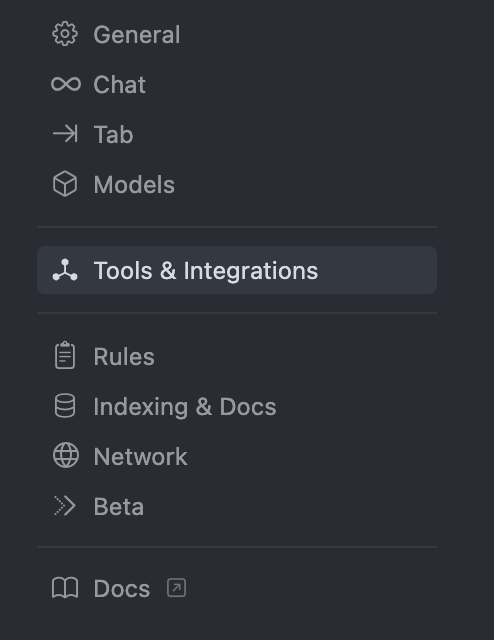
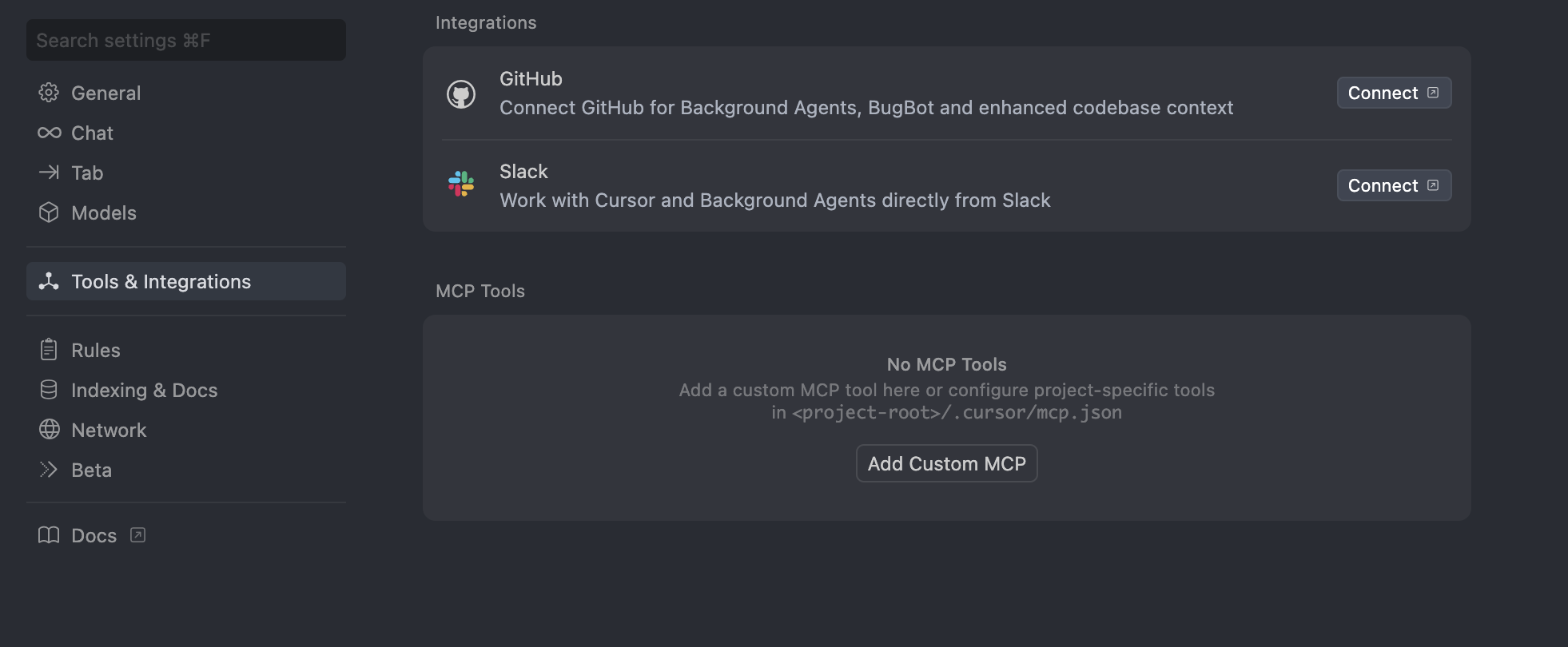
Integrate real-time context to your Cursor AI Code Editor via Membit MCP.
Cursor is an AI-powered code editor that enhances your development workflow with intelligent assistance. By integrating Membit with Cursor, you can access real-time social context directly within your coding environment, enabling your AI assistant to provide up-to-date insights about trending topics, current discussions, and breaking news while you work.
Replace <your-api-key> with your actual Membit API key. Keep this credential secure and don’t share it with unauthorized users.
Configuration Details:
Server Name: membit-remote-mcp
Command: Uses npx to run the remote MCP client
Environment: Empty object for default environment variables
5
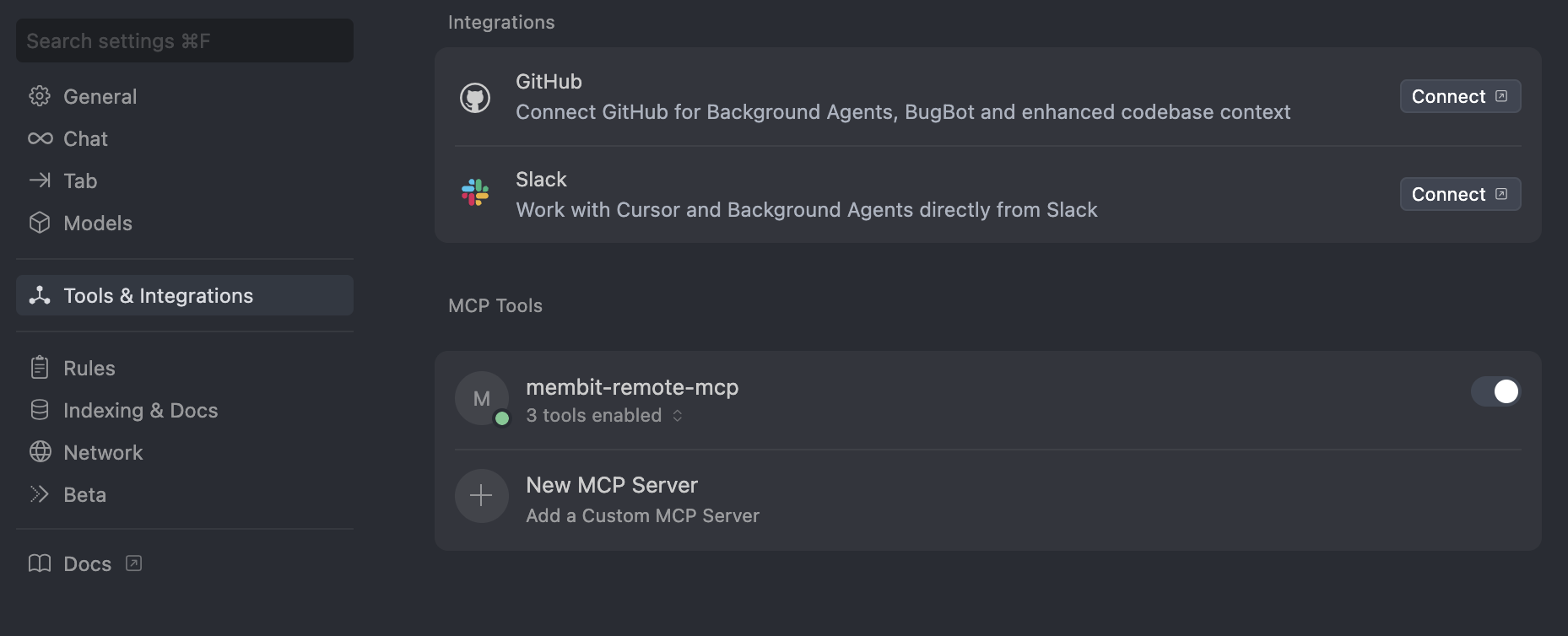
Enable Membit Remote MCP
After saving the configuration, turn on the Membit Remote MCP tool to activate the integration.
Once enabled, Cursor’s AI will have access to Membit’s real-time context capabilities when processing your requests.
Using Membit with Cursor
Now that the integration is set up, you can start using Membit’s real-time context in your development workflow:
1
Start a Chat Session
Open Cursor’s chat interface and begin a conversation with the AI assistant.
2
Ask Context-Aware Questions
Try asking questions that benefit from real-time context:
“What are the latest trends in web development?”
“Tell me about recent discussions in the AI community”
“What’s currently trending in cryptocurrency?”
“Give me insights on the latest tech news”
When Cursor asks for permission to run tools, click Run Tool to allow
access to Membit’s real-time data. Cursor requests permission every time it
uses external tools. You can bypass these permission prompts by adjusting the
tool permissions in Cursor settings if desired.
Testing Membit integration with Cursor's AI chat
Your AI assistant will now provide responses enhanced with current, real-world context from Membit’s data feed.
Troubleshooting
Custom MCP Configuration Issues
Problem: Custom MCP configuration fails to load or saveSolutions:Verify the JSON configuration syntax is valid (no trailing commas, proper quotes)Ensure the server name membit-mcp is unique and not conflictingCheck that the URL is exactly https://mcp.membit.ai/mcpTry restarting Cursor after configuration changesValidate the JSON structure matches the required format exactly
API Key Authentication Problems
Problem: Membit API key authentication is failingSolutions:Verify your API key is correctly placed in the headers configurationEnsure the header name is exactly X-Membit-Api-Key (case-sensitive)Check that there are no extra spaces or characters around the API keyConfirm your Membit API key is active and has sufficient creditsTry generating a new API key if the current one isn’t working
Tool Permission Prompts
Problem: Cursor keeps asking for permission to run toolsSolutions:Click “Run Tool” when prompted to allow Membit access for that sessionGo to Cursor settings → Tools & Integrations → adjust tool permissionsEnable “Auto-approve safe tools” if available in your Cursor versionConsider the security implications before disabling permission promptsUse “Always allow” option when prompted if you trust the Membit integration
MCP Server Not Responding
Problem: Cursor can’t connect to Membit MCP serverSolutions:Check your internet connection and firewall settingsVerify the Membit MCP server is operational (try accessing the URL in browser)Ensure Cursor has network access permissions on your systemTry toggling the MCP integration off and on againCheck Cursor’s console/logs for specific error messages
AI Assistant Not Using Membit Tools
Problem: Chat responses don’t include real-time contextSolutions:Make requests more explicit: “Use Membit to find current information about…”Verify the Membit Remote MCP tool is enabled and activeCheck that your questions relate to topics likely to have recent social media discussionTry asking about trending topics that would benefit from real-time contextEnsure you’re allowing tool usage when Cursor requests permission
⌘I
{"docsConfig":{"theme":"maple","$schema":"https://mintlify.com/docs.json","name":"Membit","colors":{"primary":"#6b6bff","light":"#8f8fff","dark":"#5050ff"},"logo":{"light":"https://mintcdn.com/membit/X3g2jASQcla7cFkX/logo/light.svg?fit=max\u0026auto=format\u0026n=X3g2jASQcla7cFkX\u0026q=85\u0026s=073455a05d026924fc23c45cbfa39fe5","dark":"https://mintcdn.com/membit/X3g2jASQcla7cFkX/logo/dark.svg?fit=max\u0026auto=format\u0026n=X3g2jASQcla7cFkX\u0026q=85\u0026s=ca8210f869368ced1a731ea54d4cfec8"},"favicon":"https://mintcdn.com/membit/4JB7OCBLDkpjkRT-/favicon.svg?fit=max\u0026auto=format\u0026n=4JB7OCBLDkpjkRT-\u0026q=85\u0026s=7148cf6afb358d781c9091fef781b848","appearance":{"default":"light","strict":true},"navbar":{"links":[{"href":"https://discord.bandprotocol.com","label":"Discord"}],"primary":{"type":"button","label":"Official Website","href":"https://membit.ai"}},"footer":{"socials":{"x":"https://x.com/membit_ai","github":"https://github.com/bandprotocol"}},"integrations":{"ga4":{"measurementId":"G-D0M7MLWDM2"}},"styling":{"latex":false},"navigation":{"pages":[]}},"deployment":{"deploymentMetadataValue":{"subdomain":"membit","hasAudioNarration":false,"actualSubdomain":"membit","customDomains":["docs.membit.ai"],"gitSource":{"type":"github","owner":"bandprotocol","repo":"membit-docs","deployBranch":"main","contentDirectory":"","isPrivate":true,"mountPath":"","label":""},"entitlements":{},"buildId":"6ae92ba07a537ee82203f242:success","clientVersion":"0.0.4205","searchFilterCounts":[{"language":"default","tag":"Get Started","count":6},{"language":"default","tag":"API Usage","count":6},{"language":"default","tag":"Usage with No-Code AI Agents","count":6},{"language":"default","tag":"Data Hunters","count":5},{"language":"default","tag":"Usage with Python Agents","count":4},{"language":"default","tag":"REST API","count":3},{"language":"default","tag":"API Reference","count":3},{"language":"default","tag":"Usage with Typescript Agents","count":2}]},"assistantConfig":{},"basePath":"","hasChatPermissions":false,"hasWebMcpPermissions":false,"toggles":[{"name":"kill-isr","enabled":true,"variant":{"name":"disabled","enabled":false,"feature_enabled":true},"impressionData":false},{"name":"custom-rbac-roles","enabled":true,"variant":{"name":"disabled","enabled":false,"feature_enabled":true},"impressionData":false},{"name":"agent-mintlify-slack","enabled":true,"variant":{"name":"disabled","enabled":false,"feature_enabled":true},"impressionData":false},{"name":"agent-integrations-settings","enabled":true,"variant":{"name":"disabled","enabled":false,"feature_enabled":true},"impressionData":false},{"name":"rbac-expansion","enabled":true,"variant":{"name":"disabled","enabled":false,"feature_enabled":true},"impressionData":false},{"name":"automations-pr-grouping","enabled":true,"variant":{"name":"disabled","enabled":false,"feature_enabled":true},"impressionData":false},{"name":"custom-prefix","enabled":true,"variant":{"name":"disabled","enabled":false,"feature_enabled":true},"impressionData":false},{"name":"analytics-v7","enabled":true,"variant":{"name":"disabled","enabled":false,"feature_enabled":true},"impressionData":false},{"name":"user-flows-analytics","enabled":true,"variant":{"name":"disabled","enabled":false,"feature_enabled":true},"impressionData":false},{"name":"no-publish-flow","enabled":true,"variant":{"name":"disabled","enabled":false,"feature_enabled":true},"impressionData":false},{"name":"workos-onboarding","enabled":true,"variant":{"name":"disabled","enabled":false,"feature_enabled":true},"impressionData":false},{"name":"snapshot-serving-live","enabled":true,"variant":{"name":"disabled","enabled":false,"feature_enabled":true},"impressionData":false},{"name":"stripTemperatureMiddleware","enabled":true,"variant":{"name":"disabled","enabled":false,"feature_enabled":true},"impressionData":false},{"name":"support-platform-pylon-zendesk","enabled":true,"variant":{"name":"disabled","enabled":false,"feature_enabled":true},"impressionData":false},{"name":"snapshot-serving","enabled":true,"variant":{"name":"disabled","enabled":false,"feature_enabled":true},"impressionData":false},{"name":"instant-rollback","enabled":true,"variant":{"name":"disabled","enabled":false,"feature_enabled":true},"impressionData":false},{"name":"granular-notifications-server","enabled":true,"variant":{"name":"disabled","enabled":false,"feature_enabled":true},"impressionData":false},{"name":"granular-notifications","enabled":true,"variant":{"name":"disabled","enabled":false,"feature_enabled":true},"impressionData":false},{"name":"automations-fable","enabled":true,"variant":{"name":"disabled","enabled":false,"feature_enabled":true},"impressionData":false},{"name":"fixed-ai-action-pricing","enabled":true,"variant":{"name":"disabled","enabled":false,"feature_enabled":true},"impressionData":false},{"name":"automation-resolve-merge-conflict","enabled":true,"variant":{"name":"disabled","enabled":false,"feature_enabled":true},"impressionData":false},{"name":"scoped-publishing","enabled":true,"variant":{"name":"disabled","enabled":false,"feature_enabled":true},"impressionData":false},{"name":"mintql","enabled":true,"variant":{"name":"disabled","enabled":false,"feature_enabled":true},"impressionData":false},{"name":"page-level-analytics","enabled":true,"variant":{"name":"disabled","enabled":false,"feature_enabled":true},"impressionData":false},{"name":"editor-version-history-v2","enabled":true,"variant":{"name":"disabled","enabled":false,"feature_enabled":true},"impressionData":false},{"name":"billing-page-v2","enabled":true,"variant":{"name":"disabled","enabled":false,"feature_enabled":true},"impressionData":false},{"name":"full-page-search","enabled":true,"variant":{"name":"disabled","enabled":false,"feature_enabled":true},"impressionData":false},{"name":"workspace-projects","enabled":true,"variant":{"name":"disabled","enabled":false,"feature_enabled":true},"impressionData":false},{"name":"assistant-v5","enabled":true,"variant":{"name":"disabled","enabled":false,"feature_enabled":true},"impressionData":false},{"name":"fork-pr-previews","enabled":true,"variant":{"name":"disabled","enabled":false,"feature_enabled":true},"impressionData":false},{"name":"revalidation-jwt","enabled":true,"variant":{"name":"disabled","enabled":false,"feature_enabled":true},"impressionData":false},{"name":"workos-sso-scim","enabled":true,"variant":{"name":"disabled","enabled":false,"feature_enabled":true},"impressionData":false},{"name":"hobby-abuse-scan","enabled":true,"variant":{"name":"disabled","enabled":false,"feature_enabled":true},"impressionData":false},{"name":"dashboard-inbox","enabled":true,"variant":{"name":"disabled","enabled":false,"feature_enabled":true},"impressionData":false},{"name":"workos-signup","enabled":true,"variant":{"name":"disabled","enabled":false,"feature_enabled":true},"impressionData":false},{"name":"turbopuffer-dual-write","enabled":true,"variant":{"name":"disabled","enabled":false,"feature_enabled":true},"impressionData":false},{"name":"workos-enabled","enabled":true,"variant":{"name":"disabled","enabled":false,"feature_enabled":true},"impressionData":false},{"name":"approve-review-flow","enabled":true,"variant":{"name":"disabled","enabled":false,"feature_enabled":true},"impressionData":false},{"name":"editor-metadata","enabled":true,"variant":{"name":"disabled","enabled":false,"feature_enabled":true},"impressionData":false},{"name":"sso-setup-deadline-banner","enabled":true,"variant":{"name":"disabled","enabled":false,"feature_enabled":true},"impressionData":false},{"name":"turbopuffer-serve","enabled":true,"variant":{"name":"disabled","enabled":false,"feature_enabled":true},"impressionData":false},{"name":"live-agents","enabled":true,"variant":{"name":"disabled","enabled":false,"feature_enabled":true},"impressionData":false},{"name":"starter-pricing","enabled":true,"variant":{"name":"control","enabled":true,"payload":{"type":"string","value":"control"},"feature_enabled":true},"impressionData":false},{"name":"llms-txt-v2","enabled":true,"variant":{"name":"disabled","enabled":false,"feature_enabled":true},"impressionData":false},{"name":"wildcard-email-auth","enabled":true,"variant":{"name":"disabled","enabled":false,"feature_enabled":true},"impressionData":false}],"googleFontsInlined":false},"customCss":[],"page":{"pagePath":"integrations/no-code-agent-frameworks/cursor","slug":"/integrations/no-code-agent-frameworks/cursor","pageMetadata":{"title":"Cursor","description":"Integrate real-time context to your Cursor AI Code Editor via Membit MCP.","icon":"); mask-image: url('/images/icons/cursor.png'); mask-size: 100% 100%;/*","href":"/integrations/no-code-agent-frameworks/cursor"},"description":{"compiledSource":"\"use strict\";\nconst {jsx: _jsx} = arguments[0];\nconst {useMDXComponents: _provideComponents} = arguments[0];\nfunction _createMdxContent(props) {\n const _components = {\n p: \"p\",\n ..._provideComponents(),\n ...props.components\n };\n return _jsx(_components.p, {\n children: \"Integrate real-time context to your Cursor AI Code Editor via Membit MCP.\"\n });\n}\nfunction MDXContent(props = {}) {\n const {wrapper: MDXLayout} = {\n ..._provideComponents(),\n ...props.components\n };\n return MDXLayout ? _jsx(MDXLayout, {\n ...props,\n children: _jsx(_createMdxContent, {\n ...props\n })\n }) : _createMdxContent(props);\n}\nreturn {\n default: MDXContent\n};\n","frontmatter":{},"scope":{}},"pageType":"default","mdx":{"mdxSource":{"compiledSource":"\"use strict\";const{Fragment:_Fragment,jsx:_jsx,jsxs:_jsxs}=arguments[0];const{useMDXComponents:_provideComponents}=arguments[0];function _createMdxContent(props){const _components={a:`a`,code:`code`,li:`li`,p:`p`,pre:`pre`,span:`span`,strong:`strong`,ul:`ul`,..._provideComponents(),...props.components},{Accordion,AccordionGroup,Check,CodeBlock,Frame,Heading,Note,OptimizedImage,Step,Steps,Warning}=_components;if(!Accordion)_missingMdxReference(`Accordion`,true);if(!AccordionGroup)_missingMdxReference(`AccordionGroup`,true);if(!Check)_missingMdxReference(`Check`,true);if(!CodeBlock)_missingMdxReference(`CodeBlock`,true);if(!Frame)_missingMdxReference(`Frame`,true);if(!Heading)_missingMdxReference(`Heading`,true);if(!Note)_missingMdxReference(`Note`,true);if(!OptimizedImage)_missingMdxReference(`OptimizedImage`,true);if(!Step)_missingMdxReference(`Step`,true);if(!Steps)_missingMdxReference(`Steps`,true);if(!Warning)_missingMdxReference(`Warning`,true);return _jsxs(_Fragment,{children:[_jsx(`img`,{src:`https://mintcdn.com/membit/4JB7OCBLDkpjkRT-/images/cover/cursor.png?fit=max\u0026auto=format\u0026n=4JB7OCBLDkpjkRT-\u0026q=85\u0026s=5c709e55c98be2f5e43e3028e2827ed1`,alt:`Cover Image`,className:`mint-rounded-lg`,noZoom:true,\"data-og-width\":`1402`,width:`1402`,\"data-og-height\":`463`,height:`463`,\"data-path\":`images/cover/cursor.png`,\"data-optimize\":`true`,\"data-opv\":`3`,srcset:`https://mintcdn.com/membit/4JB7OCBLDkpjkRT-/images/cover/cursor.png?w=280\u0026fit=max\u0026auto=format\u0026n=4JB7OCBLDkpjkRT-\u0026q=85\u0026s=2d04b862aac91ce955bb39adb6c70821 280w, https://mintcdn.com/membit/4JB7OCBLDkpjkRT-/images/cover/cursor.png?w=560\u0026fit=max\u0026auto=format\u0026n=4JB7OCBLDkpjkRT-\u0026q=85\u0026s=88b2267503d69ca93d1a99fe3dcbd0c7 560w, https://mintcdn.com/membit/4JB7OCBLDkpjkRT-/images/cover/cursor.png?w=840\u0026fit=max\u0026auto=format\u0026n=4JB7OCBLDkpjkRT-\u0026q=85\u0026s=1411ccf28c9f1d86e58133ed6143894f 840w, https://mintcdn.com/membit/4JB7OCBLDkpjkRT-/images/cover/cursor.png?w=1100\u0026fit=max\u0026auto=format\u0026n=4JB7OCBLDkpjkRT-\u0026q=85\u0026s=f185a6542d2f3e606d41ad2fe1fcdb5e 1100w, https://mintcdn.com/membit/4JB7OCBLDkpjkRT-/images/cover/cursor.png?w=1650\u0026fit=max\u0026auto=format\u0026n=4JB7OCBLDkpjkRT-\u0026q=85\u0026s=af6cb292a745e9999d54565d129434ad 1650w, https://mintcdn.com/membit/4JB7OCBLDkpjkRT-/images/cover/cursor.png?w=2500\u0026fit=max\u0026auto=format\u0026n=4JB7OCBLDkpjkRT-\u0026q=85\u0026s=45d72881a9530add77a4384fba862473 2500w`}),`\n`,_jsx(_components.p,{children:`Cursor is an AI-powered code editor that enhances your development workflow with intelligent assistance. By integrating Membit with Cursor, you can access real-time social context directly within your coding environment, enabling your AI assistant to provide up-to-date insights about trending topics, current discussions, and breaking news while you work.`}),`\n`,_jsx(Heading,{level:`2`,id:`prerequisites`,children:`Prerequisites`}),`\n`,_jsx(_components.p,{children:`Before you begin, make sure you have:`}),`\n`,_jsxs(_components.ul,{children:[`\n`,_jsxs(_components.li,{children:[`Cursor editor installed (`,_jsx(_components.a,{href:`https://cursor.com`,children:`download here`}),`)`]}),`\n`,_jsxs(_components.li,{children:[`A Membit account with an API key `,_jsx(_components.a,{href:`/access-and-auth`,children:`get your API key`})]}),`\n`,_jsx(_components.li,{children:`Basic familiarity with Cursor’s interface and AI features`}),`\n`]}),`\n`,_jsx(Heading,{level:`2`,id:`setting-up-membit-mcp-integration`,children:`Setting Up Membit MCP Integration`}),`\n`,_jsx(_components.p,{children:`Follow these steps to integrate Membit with your Cursor environment:`}),`\n`,_jsxs(Steps,{children:[_jsxs(Step,{title:`Access Cursor Settings`,children:[_jsx(_components.p,{children:`Open Cursor and navigate to the settings by clicking on the settings icon or using the keyboard shortcut.`}),_jsx(Frame,{children:_jsx(OptimizedImage,{width:`240`,src:`https://mintcdn.com/membit/4JB7OCBLDkpjkRT-/images/cursor/setting.png?fit=max\u0026auto=format\u0026n=4JB7OCBLDkpjkRT-\u0026q=85\u0026s=d20f8a4a5217054a731589aab46fb903`,alt:`Cursor settings interface showing configuration options`,\"data-og-width\":`494`,\"data-og-height\":`640`,\"data-path\":`images/cursor/setting.png`,\"data-optimize\":`true`,\"data-opv\":`3`,srcset:`https://mintcdn.com/membit/4JB7OCBLDkpjkRT-/images/cursor/setting.png?w=280\u0026fit=max\u0026auto=format\u0026n=4JB7OCBLDkpjkRT-\u0026q=85\u0026s=4c69a12a4c7d5892a8e9c13c2f32b7b0 280w, https://mintcdn.com/membit/4JB7OCBLDkpjkRT-/images/cursor/setting.png?w=560\u0026fit=max\u0026auto=format\u0026n=4JB7OCBLDkpjkRT-\u0026q=85\u0026s=93e7f43458f360497da9c7339ba608bf 560w, https://mintcdn.com/membit/4JB7OCBLDkpjkRT-/images/cursor/setting.png?w=840\u0026fit=max\u0026auto=format\u0026n=4JB7OCBLDkpjkRT-\u0026q=85\u0026s=215b8c4a30a8a04ebfcbf11828689f9f 840w, https://mintcdn.com/membit/4JB7OCBLDkpjkRT-/images/cursor/setting.png?w=1100\u0026fit=max\u0026auto=format\u0026n=4JB7OCBLDkpjkRT-\u0026q=85\u0026s=7065cc1270e454f5366194671a368612 1100w, https://mintcdn.com/membit/4JB7OCBLDkpjkRT-/images/cursor/setting.png?w=1650\u0026fit=max\u0026auto=format\u0026n=4JB7OCBLDkpjkRT-\u0026q=85\u0026s=43ee48b1ebc58481cc70322da3823b64 1650w, https://mintcdn.com/membit/4JB7OCBLDkpjkRT-/images/cursor/setting.png?w=2500\u0026fit=max\u0026auto=format\u0026n=4JB7OCBLDkpjkRT-\u0026q=85\u0026s=9c2e561efb50efb40d9eaff10ed1ff95 2500w`})})]}),_jsxs(Step,{title:`Navigate to Tools \u0026 Integrations`,children:[_jsxs(_components.p,{children:[`In the settings menu, locate and click on `,_jsx(_components.strong,{children:`Tools \u0026 Integrations`}),` to access external service configurations.`]}),_jsx(Frame,{children:_jsx(OptimizedImage,{src:`https://mintcdn.com/membit/4JB7OCBLDkpjkRT-/images/cursor/tools.png?fit=max\u0026auto=format\u0026n=4JB7OCBLDkpjkRT-\u0026q=85\u0026s=0ab609ca381d95141d325e8d258f5a29`,alt:`Cursor tools and integrations settings page`,\"data-og-width\":`1962`,width:`1962`,\"data-og-height\":`810`,height:`810`,\"data-path\":`images/cursor/tools.png`,\"data-optimize\":`true`,\"data-opv\":`3`,srcset:`https://mintcdn.com/membit/4JB7OCBLDkpjkRT-/images/cursor/tools.png?w=280\u0026fit=max\u0026auto=format\u0026n=4JB7OCBLDkpjkRT-\u0026q=85\u0026s=05de116e891ef2a9c15bf4a640954bb0 280w, https://mintcdn.com/membit/4JB7OCBLDkpjkRT-/images/cursor/tools.png?w=560\u0026fit=max\u0026auto=format\u0026n=4JB7OCBLDkpjkRT-\u0026q=85\u0026s=43169890dfbd3ef60a818f34ecc594d3 560w, https://mintcdn.com/membit/4JB7OCBLDkpjkRT-/images/cursor/tools.png?w=840\u0026fit=max\u0026auto=format\u0026n=4JB7OCBLDkpjkRT-\u0026q=85\u0026s=9f335b4f84a8f101181d17b4f2a44704 840w, https://mintcdn.com/membit/4JB7OCBLDkpjkRT-/images/cursor/tools.png?w=1100\u0026fit=max\u0026auto=format\u0026n=4JB7OCBLDkpjkRT-\u0026q=85\u0026s=d9cc7e0bf77486d529054c29c7280985 1100w, https://mintcdn.com/membit/4JB7OCBLDkpjkRT-/images/cursor/tools.png?w=1650\u0026fit=max\u0026auto=format\u0026n=4JB7OCBLDkpjkRT-\u0026q=85\u0026s=086877d3f8db05f23855c4f412fb6817 1650w, https://mintcdn.com/membit/4JB7OCBLDkpjkRT-/images/cursor/tools.png?w=2500\u0026fit=max\u0026auto=format\u0026n=4JB7OCBLDkpjkRT-\u0026q=85\u0026s=0b701bfdff2248492b42b0ced28c45e6 2500w`})}),_jsx(Check,{children:_jsx(_components.p,{children:`The Tools \u0026 Integrations section allows you to connect external services and tools to enhance Cursor’s capabilities.`})})]}),_jsx(Step,{title:`Add Custom MCP`,children:_jsxs(_components.p,{children:[`Click `,_jsx(_components.strong,{children:`Add Custom MCP`}),` to create a new Model Context Protocol integration.`]})}),_jsxs(Step,{title:`Configure Membit Remote MCP`,children:[_jsx(_components.p,{children:`Paste the following Membit remote MCP configuration into the configuration field:`}),_jsx(CodeBlock,{filename:``,numberOfLines:`10`,language:`json`,children:_jsx(_components.pre,{className:`shiki shiki-themes github-light-default dark-plus`,style:{backgroundColor:`#ffffff`,\"--shiki-dark-bg\":`#0B0C0E`,color:`#1f2328`,\"--shiki-dark\":`#D4D4D4`},language:`json`,children:_jsxs(_components.code,{language:`json`,numberOfLines:`10`,children:[_jsx(_components.span,{className:`line`,children:_jsx(_components.span,{style:{color:`#1F2328`,\"--shiki-dark\":`#D4D4D4`},children:`{`})}),`\n`,_jsxs(_components.span,{className:`line`,children:[_jsx(_components.span,{style:{color:`#116329`,\"--shiki-dark\":`#9CDCFE`},children:` \"mcpServers\"`}),_jsx(_components.span,{style:{color:`#1F2328`,\"--shiki-dark\":`#D4D4D4`},children:`: {`})]}),`\n`,_jsxs(_components.span,{className:`line`,children:[_jsx(_components.span,{style:{color:`#116329`,\"--shiki-dark\":`#9CDCFE`},children:` \"membit-mcp\"`}),_jsx(_components.span,{style:{color:`#1F2328`,\"--shiki-dark\":`#D4D4D4`},children:`: {`})]}),`\n`,_jsxs(_components.span,{className:`line`,children:[_jsx(_components.span,{style:{color:`#116329`,\"--shiki-dark\":`#9CDCFE`},children:` \"url\"`}),_jsx(_components.span,{style:{color:`#1F2328`,\"--shiki-dark\":`#D4D4D4`},children:`: `}),_jsx(_components.span,{style:{color:`#0A3069`,\"--shiki-dark\":`#CE9178`},children:`\"https://mcp.membit.ai/mcp\"`}),_jsx(_components.span,{style:{color:`#1F2328`,\"--shiki-dark\":`#D4D4D4`},children:`,`})]}),`\n`,_jsxs(_components.span,{className:`line`,children:[_jsx(_components.span,{style:{color:`#116329`,\"--shiki-dark\":`#9CDCFE`},children:` \"headers\"`}),_jsx(_components.span,{style:{color:`#1F2328`,\"--shiki-dark\":`#D4D4D4`},children:`: {`})]}),`\n`,_jsxs(_components.span,{className:`line`,children:[_jsx(_components.span,{style:{color:`#116329`,\"--shiki-dark\":`#9CDCFE`},children:` \"X-Membit-Api-Key\"`}),_jsx(_components.span,{style:{color:`#1F2328`,\"--shiki-dark\":`#D4D4D4`},children:`: `}),_jsx(_components.span,{style:{color:`#82071E`,\"--shiki-light-font-style\":`italic`,\"--shiki-dark\":`#F44747`,\"--shiki-dark-font-style\":`inherit`},children:`\u003cyour-api-key>`})]}),`\n`,_jsx(_components.span,{className:`line`,children:_jsx(_components.span,{style:{color:`#1F2328`,\"--shiki-dark\":`#D4D4D4`},children:` }`})}),`\n`,_jsx(_components.span,{className:`line`,children:_jsx(_components.span,{style:{color:`#1F2328`,\"--shiki-dark\":`#D4D4D4`},children:` }`})}),`\n`,_jsx(_components.span,{className:`line`,children:_jsx(_components.span,{style:{color:`#1F2328`,\"--shiki-dark\":`#D4D4D4`},children:` }`})}),`\n`,_jsx(_components.span,{className:`line`,children:_jsx(_components.span,{style:{color:`#1F2328`,\"--shiki-dark\":`#D4D4D4`},children:`}`})}),`\n`]})})}),_jsx(Warning,{children:_jsxs(_components.p,{children:[`Replace `,_jsx(_components.code,{children:`\u003cyour-api-key>`}),` with your actual Membit API key. Keep this credential secure and don’t share it with unauthorized users.`]})}),_jsx(_components.p,{children:_jsx(_components.strong,{children:`Configuration Details:`})}),_jsxs(_components.ul,{children:[`\n`,_jsxs(_components.li,{children:[_jsx(_components.strong,{children:`Server Name`}),`: `,_jsx(_components.code,{children:`membit-remote-mcp`})]}),`\n`,_jsxs(_components.li,{children:[_jsx(_components.strong,{children:`Command`}),`: Uses npx to run the remote MCP client`]}),`\n`,_jsxs(_components.li,{children:[_jsx(_components.strong,{children:`Environment`}),`: Empty object for default environment variables`]}),`\n`]})]}),_jsxs(Step,{title:`Enable Membit Remote MCP`,children:[_jsxs(_components.p,{children:[`After saving the configuration, turn on the `,_jsx(_components.strong,{children:`Membit Remote MCP`}),` tool to activate the integration.`]}),_jsx(Frame,{children:_jsx(OptimizedImage,{src:`https://mintcdn.com/membit/4JB7OCBLDkpjkRT-/images/cursor/turn-on.png?fit=max\u0026auto=format\u0026n=4JB7OCBLDkpjkRT-\u0026q=85\u0026s=f70b4554afc1c1765da7b32068647960`,alt:`Cursor interface showing how to enable Membit Remote MCP tool`,\"data-og-width\":`1858`,width:`1858`,\"data-og-height\":`754`,height:`754`,\"data-path\":`images/cursor/turn-on.png`,\"data-optimize\":`true`,\"data-opv\":`3`,srcset:`https://mintcdn.com/membit/4JB7OCBLDkpjkRT-/images/cursor/turn-on.png?w=280\u0026fit=max\u0026auto=format\u0026n=4JB7OCBLDkpjkRT-\u0026q=85\u0026s=b37af6e6432e90b599e9a9537b09eea2 280w, https://mintcdn.com/membit/4JB7OCBLDkpjkRT-/images/cursor/turn-on.png?w=560\u0026fit=max\u0026auto=format\u0026n=4JB7OCBLDkpjkRT-\u0026q=85\u0026s=8c97acc1b44ffd676d3ca7675f912a44 560w, https://mintcdn.com/membit/4JB7OCBLDkpjkRT-/images/cursor/turn-on.png?w=840\u0026fit=max\u0026auto=format\u0026n=4JB7OCBLDkpjkRT-\u0026q=85\u0026s=c91359fc7a1df692c06a8c7913290210 840w, https://mintcdn.com/membit/4JB7OCBLDkpjkRT-/images/cursor/turn-on.png?w=1100\u0026fit=max\u0026auto=format\u0026n=4JB7OCBLDkpjkRT-\u0026q=85\u0026s=eabf81ebd6dce65a6a17236eb30446bf 1100w, https://mintcdn.com/membit/4JB7OCBLDkpjkRT-/images/cursor/turn-on.png?w=1650\u0026fit=max\u0026auto=format\u0026n=4JB7OCBLDkpjkRT-\u0026q=85\u0026s=3fbd2fc2cdd4046c602a33db49c02328 1650w, https://mintcdn.com/membit/4JB7OCBLDkpjkRT-/images/cursor/turn-on.png?w=2500\u0026fit=max\u0026auto=format\u0026n=4JB7OCBLDkpjkRT-\u0026q=85\u0026s=faaee3436cc50b4f7f4e2d4952271b6f 2500w`})}),_jsx(Check,{children:_jsx(_components.p,{children:`Once enabled, Cursor’s AI will have access to Membit’s real-time context capabilities when processing your requests.`})})]})]}),`\n`,_jsx(Heading,{level:`2`,id:`using-membit-with-cursor`,children:`Using Membit with Cursor`}),`\n`,_jsx(_components.p,{children:`Now that the integration is set up, you can start using Membit’s real-time context in your development workflow:`}),`\n`,_jsxs(Steps,{children:[_jsx(Step,{title:`Start a Chat Session`,children:_jsx(_components.p,{children:`Open Cursor’s chat interface and begin a conversation with the AI assistant.`})}),_jsxs(Step,{title:`Ask Context-Aware Questions`,children:[_jsx(_components.p,{children:`Try asking questions that benefit from real-time context:`}),_jsxs(_components.ul,{children:[`\n`,_jsx(_components.li,{children:`“What are the latest trends in web development?”`}),`\n`,_jsx(_components.li,{children:`“Tell me about recent discussions in the AI community”`}),`\n`,_jsx(_components.li,{children:`“What’s currently trending in cryptocurrency?”`}),`\n`,_jsx(_components.li,{children:`“Give me insights on the latest tech news”`}),`\n`]}),_jsx(Note,{children:_jsxs(_components.p,{children:[`When Cursor asks for permission to run tools, click `,_jsx(_components.strong,{children:`Run Tool`}),` to allow\naccess to Membit’s real-time data. Cursor requests permission every time it\nuses external tools. You can bypass these permission prompts by adjusting the\ntool permissions in Cursor settings if desired.`]})}),_jsx(Frame,{caption:`Testing Membit integration with Cursor's AI chat`,children:_jsx(OptimizedImage,{src:`https://mintcdn.com/membit/4JB7OCBLDkpjkRT-/images/cursor/talk-with-chat.png?fit=max\u0026auto=format\u0026n=4JB7OCBLDkpjkRT-\u0026q=85\u0026s=683798b545e317e01be128e7b9a7b424`,alt:`Cursor chat interface showing conversation with real-time context from Membit`,\"data-og-width\":`1434`,width:`1434`,\"data-og-height\":`2032`,height:`2032`,\"data-path\":`images/cursor/talk-with-chat.png`,\"data-optimize\":`true`,\"data-opv\":`3`,srcset:`https://mintcdn.com/membit/4JB7OCBLDkpjkRT-/images/cursor/talk-with-chat.png?w=280\u0026fit=max\u0026auto=format\u0026n=4JB7OCBLDkpjkRT-\u0026q=85\u0026s=f20960e00b62965481b3c2bb6a941602 280w, https://mintcdn.com/membit/4JB7OCBLDkpjkRT-/images/cursor/talk-with-chat.png?w=560\u0026fit=max\u0026auto=format\u0026n=4JB7OCBLDkpjkRT-\u0026q=85\u0026s=f498090502c15851298be202538c28d7 560w, https://mintcdn.com/membit/4JB7OCBLDkpjkRT-/images/cursor/talk-with-chat.png?w=840\u0026fit=max\u0026auto=format\u0026n=4JB7OCBLDkpjkRT-\u0026q=85\u0026s=1d814059e5bb453df7b04a22c8526012 840w, https://mintcdn.com/membit/4JB7OCBLDkpjkRT-/images/cursor/talk-with-chat.png?w=1100\u0026fit=max\u0026auto=format\u0026n=4JB7OCBLDkpjkRT-\u0026q=85\u0026s=424cb90edafb81b64af0145fbb995afd 1100w, https://mintcdn.com/membit/4JB7OCBLDkpjkRT-/images/cursor/talk-with-chat.png?w=1650\u0026fit=max\u0026auto=format\u0026n=4JB7OCBLDkpjkRT-\u0026q=85\u0026s=959efc6121999db885b82813039590e2 1650w, https://mintcdn.com/membit/4JB7OCBLDkpjkRT-/images/cursor/talk-with-chat.png?w=2500\u0026fit=max\u0026auto=format\u0026n=4JB7OCBLDkpjkRT-\u0026q=85\u0026s=cf5f666c4f32b2a2022f058724f19aec 2500w`})}),_jsx(Check,{children:_jsx(_components.p,{children:`Your AI assistant will now provide responses enhanced with current, real-world context from Membit’s data feed.`})})]})]}),`\n`,_jsx(Heading,{level:`2`,id:`troubleshooting`,children:`Troubleshooting`}),`\n`,_jsxs(AccordionGroup,{children:[_jsxs(Accordion,{title:`Custom MCP Configuration Issues`,id:`custom-mcp-configuration-issues`,children:[_jsxs(_components.p,{children:[_jsx(_components.strong,{children:`Problem`}),`: Custom MCP configuration fails to load or save`]}),_jsxs(_components.p,{children:[_jsx(_components.strong,{children:`Solutions`}),`:`]}),_jsx(_components.p,{children:`Verify the JSON configuration syntax is valid (no trailing commas, proper quotes)`}),_jsxs(_components.p,{children:[`Ensure the server name `,_jsx(_components.code,{children:`membit-mcp`}),` is unique and not conflicting`]}),_jsxs(_components.p,{children:[`Check that the URL is exactly `,_jsx(_components.code,{children:`https://mcp.membit.ai/mcp`})]}),_jsx(_components.p,{children:`Try restarting Cursor after configuration changes`}),_jsx(_components.p,{children:`Validate the JSON structure matches the required format exactly`})]}),_jsxs(Accordion,{title:`API Key Authentication Problems`,id:`api-key-authentication-problems`,children:[_jsxs(_components.p,{children:[_jsx(_components.strong,{children:`Problem`}),`: Membit API key authentication is failing`]}),_jsxs(_components.p,{children:[_jsx(_components.strong,{children:`Solutions`}),`:`]}),_jsx(_components.p,{children:`Verify your API key is correctly placed in the headers configuration`}),_jsxs(_components.p,{children:[`Ensure the header name is exactly `,_jsx(_components.code,{children:`X-Membit-Api-Key`}),` (case-sensitive)`]}),_jsx(_components.p,{children:`Check that there are no extra spaces or characters around the API key`}),_jsx(_components.p,{children:`Confirm your Membit API key is active and has sufficient credits`}),_jsx(_components.p,{children:`Try generating a new API key if the current one isn’t working`})]}),_jsxs(Accordion,{title:`Tool Permission Prompts`,id:`tool-permission-prompts`,children:[_jsxs(_components.p,{children:[_jsx(_components.strong,{children:`Problem`}),`: Cursor keeps asking for permission to run tools`]}),_jsxs(_components.p,{children:[_jsx(_components.strong,{children:`Solutions`}),`:`]}),_jsx(_components.p,{children:`Click “Run Tool” when prompted to allow Membit access for that session`}),_jsx(_components.p,{children:`Go to Cursor settings → Tools \u0026 Integrations → adjust tool permissions`}),_jsx(_components.p,{children:`Enable “Auto-approve safe tools” if available in your Cursor version`}),_jsx(_components.p,{children:`Consider the security implications before disabling permission prompts`}),_jsx(_components.p,{children:`Use “Always allow” option when prompted if you trust the Membit integration`})]}),_jsxs(Accordion,{title:`MCP Server Not Responding`,id:`mcp-server-not-responding`,children:[_jsxs(_components.p,{children:[_jsx(_components.strong,{children:`Problem`}),`: Cursor can’t connect to Membit MCP server`]}),_jsxs(_components.p,{children:[_jsx(_components.strong,{children:`Solutions`}),`:`]}),_jsx(_components.p,{children:`Check your internet connection and firewall settings`}),_jsx(_components.p,{children:`Verify the Membit MCP server is operational (try accessing the URL in browser)`}),_jsx(_components.p,{children:`Ensure Cursor has network access permissions on your system`}),_jsx(_components.p,{children:`Try toggling the MCP integration off and on again`}),_jsx(_components.p,{children:`Check Cursor’s console/logs for specific error messages`})]}),_jsxs(Accordion,{title:`AI Assistant Not Using Membit Tools`,id:`ai-assistant-not-using-membit-tools`,children:[_jsxs(_components.p,{children:[_jsx(_components.strong,{children:`Problem`}),`: Chat responses don’t include real-time context`]}),_jsxs(_components.p,{children:[_jsx(_components.strong,{children:`Solutions`}),`:`]}),_jsx(_components.p,{children:`Make requests more explicit: “Use Membit to find current information about…”`}),_jsx(_components.p,{children:`Verify the Membit Remote MCP tool is enabled and active`}),_jsx(_components.p,{children:`Check that your questions relate to topics likely to have recent social media discussion`}),_jsx(_components.p,{children:`Try asking about trending topics that would benefit from real-time context`}),_jsx(_components.p,{children:`Ensure you’re allowing tool usage when Cursor requests permission`})]})]})]})}function MDXContent(props={}){const{wrapper:MDXLayout}={..._provideComponents(),...props.components};return MDXLayout?_jsx(MDXLayout,{...props,children:_jsx(_createMdxContent,{...props})}):_createMdxContent(props)}return{default:MDXContent};function _missingMdxReference(id,component){throw new Error(`Expected `+(component?`component`:`object`)+\" `\"+id+\"` to be defined: you likely forgot to import, pass, or provide it.\")}","frontmatter":{},"scope":{"config":{},"pageMetadata":{"title":"Cursor","description":"Integrate real-time context to your Cursor AI Code Editor via Membit MCP.","icon":"); mask-image: url('/images/icons/cursor.png'); mask-size: 100% 100%;/*","href":"/integrations/no-code-agent-frameworks/cursor"}}},"mdxSourceWithNoJs":null},"mdxExtracts":{"tableOfContents":[{"title":"Prerequisites","slug":"prerequisites","depth":2,"children":[]},{"title":"Setting Up Membit MCP Integration","slug":"setting-up-membit-mcp-integration","depth":2,"children":[]},{"title":"Using Membit with Cursor","slug":"using-membit-with-cursor","depth":2,"children":[]},{"title":"Troubleshooting","slug":"troubleshooting","depth":2,"children":[]}],"codeExamples":{}},"jsLinks":[],"dynamicCss":".mint-rounded-lg {\n border-radius: 0.5rem\n}","subdomain":"membit","siteName":"Membit","title":"Cursor - Membit","navMaps":{"firstHrefInVersion":{},"firstHrefInLanguage":{}},"lastModified":"2026-01-07T10:01:52.859Z","originalFileLocation":"integrations/no-code-agent-frameworks/cursor.mdx"},"headHtml":"\u003cscript data-mint-head>(function(){var d=document.documentElement,p=\"light\";if(!p){try{p=localStorage.getItem(\"isDarkMode\")}catch(e){}if(p==='true')p='dark';else if(p==='false')p='light';if(p!=='light'\u0026\u0026p!=='dark'\u0026\u0026p!=='system')p=\"light\"}var r=p==='system'?(matchMedia(\"(prefers-color-scheme: dark)\").matches?'dark':'light'):p;d.classList.remove(r==='dark'?'light':'dark');d.classList.add(r);d.setAttribute(\"data-theme-preference\",p)})();\u003c/script>\u003cmeta data-mint-head name=\"description\" content=\"Integrate real-time context to your Cursor AI Code Editor via Membit MCP.\">\u003cmeta data-mint-head name=\"application-name\" content=\"Membit\">\u003cmeta data-mint-head name=\"generator\" content=\"Mintlify\">\u003clink data-mint-head rel=\"icon\" type=\"image/png\" sizes=\"192x192\" href=\"/mintlify-assets/_mintlify/favicons/membit/t44AnaG2cSUdzgTj/_generated/favicon/android-chrome-192x192.png\" media=\"(prefers-color-scheme: light)\">\u003clink data-mint-head rel=\"apple-touch-icon\" type=\"image/png\" sizes=\"180x180\" href=\"/mintlify-assets/_mintlify/favicons/membit/t44AnaG2cSUdzgTj/_generated/favicon/apple-touch-icon.png\">\u003clink data-mint-head rel=\"icon\" type=\"image/png\" sizes=\"16x16\" href=\"/mintlify-assets/_mintlify/favicons/membit/t44AnaG2cSUdzgTj/_generated/favicon/favicon-16x16.png\" media=\"(prefers-color-scheme: light)\">\u003clink data-mint-head rel=\"icon\" type=\"image/png\" sizes=\"32x32\" href=\"/mintlify-assets/_mintlify/favicons/membit/t44AnaG2cSUdzgTj/_generated/favicon/favicon-32x32.png\" media=\"(prefers-color-scheme: light)\">\u003clink data-mint-head rel=\"shortcut icon\" type=\"image/x-icon\" href=\"/mintlify-assets/_mintlify/favicons/membit/t44AnaG2cSUdzgTj/_generated/favicon/favicon.ico\" media=\"(prefers-color-scheme: light)\">\u003clink data-mint-head rel=\"icon\" type=\"image/png\" sizes=\"192x192\" href=\"/mintlify-assets/_mintlify/favicons/membit/t44AnaG2cSUdzgTj/_generated/favicon-dark/android-chrome-192x192.png\" media=\"(prefers-color-scheme: dark)\">\u003clink data-mint-head rel=\"icon\" type=\"image/png\" sizes=\"16x16\" href=\"/mintlify-assets/_mintlify/favicons/membit/t44AnaG2cSUdzgTj/_generated/favicon-dark/favicon-16x16.png\" media=\"(prefers-color-scheme: dark)\">\u003clink data-mint-head rel=\"icon\" type=\"image/png\" sizes=\"32x32\" href=\"/mintlify-assets/_mintlify/favicons/membit/t44AnaG2cSUdzgTj/_generated/favicon-dark/favicon-32x32.png\" media=\"(prefers-color-scheme: dark)\">\u003clink data-mint-head rel=\"shortcut icon\" type=\"image/x-icon\" href=\"/mintlify-assets/_mintlify/favicons/membit/t44AnaG2cSUdzgTj/_generated/favicon-dark/favicon.ico\" media=\"(prefers-color-scheme: dark)\">\u003cmeta data-mint-head property=\"og:title\" content=\"Cursor - Membit\">\u003cmeta data-mint-head property=\"og:description\" content=\"Integrate real-time context to your Cursor AI Code Editor via Membit MCP.\">\u003cmeta data-mint-head property=\"og:site_name\" content=\"Membit\">\u003cmeta data-mint-head property=\"og:url\" content=\"https://docs.membit.ai/integrations/no-code-agent-frameworks/cursor\">\u003cmeta data-mint-head property=\"og:type\" content=\"website\">\u003cmeta data-mint-head property=\"og:image\" content=\"https://membit.mintlify.site/_mintlify/api/og/v2?division=Usage+with+No-Code+AI+Agents\u0026amp;title=Cursor\u0026amp;description=Integrate+real-time+context+to+your+Cursor+AI+Code+Editor+via+Membit+MCP.\u0026amp;theme=bf8df9eb827cb54f2149bcae\u0026amp;signature=2fe045edf78cec2f1cf4387b9f7ddb4a4fe4203d69f67b6b907957585b344e9e\">\u003cmeta data-mint-head property=\"og:image:width\" content=\"1200\">\u003cmeta data-mint-head property=\"og:image:height\" content=\"630\">\u003cmeta data-mint-head name=\"twitter:card\" content=\"summary_large_image\">\u003cmeta data-mint-head name=\"twitter:title\" content=\"Cursor - Membit\">\u003cmeta data-mint-head name=\"twitter:description\" content=\"Integrate real-time context to your Cursor AI Code Editor via Membit MCP.\">\u003cmeta data-mint-head name=\"twitter:image\" content=\"https://membit.mintlify.site/_mintlify/api/og/v2?division=Usage+with+No-Code+AI+Agents\u0026amp;title=Cursor\u0026amp;description=Integrate+real-time+context+to+your+Cursor+AI+Code+Editor+via+Membit+MCP.\u0026amp;theme=bf8df9eb827cb54f2149bcae\u0026amp;signature=2fe045edf78cec2f1cf4387b9f7ddb4a4fe4203d69f67b6b907957585b344e9e\">\u003cmeta data-mint-head name=\"twitter:image:width\" content=\"1200\">\u003cmeta data-mint-head name=\"twitter:image:height\" content=\"630\">\u003cmeta data-mint-head name=\"msapplication-config\" content=\"/mintlify-assets/_mintlify/favicons/membit/t44AnaG2cSUdzgTj/_generated/favicon/browserconfig.xml\">\u003cmeta data-mint-head name=\"apple-mobile-web-app-title\" content=\"Membit\">\u003cmeta data-mint-head name=\"msapplication-TileColor\" content=\"#6b6bff\">\u003clink data-mint-head rel=\"canonical\" href=\"https://docs.membit.ai/integrations/no-code-agent-frameworks/cursor\">\u003clink data-mint-head rel=\"alternate\" type=\"application/xml\" href=\"/sitemap.xml\">\u003clink data-mint-head rel=\"alternate\" type=\"text/markdown\" href=\"/integrations/no-code-agent-frameworks/cursor.md\">\u003cscript data-mint-head type=\"application/ld+json\">{\"@context\":\"https://schema.org\",\"@graph\":[{\"@type\":\"Organization\",\"@id\":\"https://docs.membit.ai/#organization\",\"name\":\"Membit\",\"url\":\"https://docs.membit.ai\",\"logo\":{\"@type\":\"ImageObject\",\"url\":\"https://mintcdn.com/membit/X3g2jASQcla7cFkX/logo/light.svg?fit=max\u0026auto=format\u0026n=X3g2jASQcla7cFkX\u0026q=85\u0026s=073455a05d026924fc23c45cbfa39fe5\"}},{\"@type\":\"WebSite\",\"@id\":\"https://docs.membit.ai#website\",\"name\":\"Membit\",\"url\":\"https://docs.membit.ai\",\"publisher\":{\"@id\":\"https://docs.membit.ai/#organization\"}},{\"@type\":\"WebPage\",\"@id\":\"https://docs.membit.ai/integrations/no-code-agent-frameworks/cursor#webpage\",\"url\":\"https://docs.membit.ai/integrations/no-code-agent-frameworks/cursor\",\"name\":\"Cursor\",\"description\":\"Integrate real-time context to your Cursor AI Code Editor via Membit MCP.\",\"dateModified\":\"2026-01-07T10:01:52.859Z\",\"isPartOf\":{\"@id\":\"https://docs.membit.ai#website\"},\"breadcrumb\":{\"@id\":\"https://docs.membit.ai/integrations/no-code-agent-frameworks/cursor#breadcrumb\"}},{\"@type\":\"BreadcrumbList\",\"@id\":\"https://docs.membit.ai/integrations/no-code-agent-frameworks/cursor#breadcrumb\",\"itemListElement\":[{\"@type\":\"ListItem\",\"position\":1,\"name\":\"Usage with No-Code AI Agents\",\"item\":\"https://docs.membit.ai/integrations/no-code-agent-frameworks/n8n\"},{\"@type\":\"ListItem\",\"position\":2,\"name\":\"Cursor\",\"item\":\"https://docs.membit.ai/integrations/no-code-agent-frameworks/cursor\"}]},{\"@type\":[\"Article\",\"TechArticle\"],\"@id\":\"https://docs.membit.ai/integrations/no-code-agent-frameworks/cursor#article\",\"headline\":\"Cursor\",\"name\":\"Cursor\",\"description\":\"Integrate real-time context to your Cursor AI Code Editor via Membit MCP.\",\"url\":\"https://docs.membit.ai/integrations/no-code-agent-frameworks/cursor\",\"mainEntityOfPage\":{\"@id\":\"https://docs.membit.ai/integrations/no-code-agent-frameworks/cursor#webpage\"},\"dateModified\":\"2026-01-07T10:01:52.859Z\",\"publisher\":{\"@id\":\"https://docs.membit.ai/#organization\"},\"isPartOf\":{\"@id\":\"https://docs.membit.ai#website\"}}]}\u003c/script>\u003cscript data-mint-head type=\"application/ld+json\">{\"@context\":\"https://schema.org\",\"@type\":\"WebSite\",\"name\":\"Membit\",\"publisher\":{\"@type\":\"Organization\",\"name\":\"Membit\"},\"provider\":{\"@type\":\"Organization\",\"name\":\"Mintlify\",\"url\":\"https://mintlify.com\"}}\u003c/script>","agentPointerHref":"/integrations/no-code-agent-frameworks/cursor.md","siteName":"Membit","nav":{"global":null,"groups":[{"group":"Get Started","pages":[{"title":"Welcome","icon":"hand-wave","href":"/index"},{"title":"How Membit Works","icon":"microchip","href":"/how-membit-works"},{"title":"Use Cases","icon":"lightbulb","href":"/use-cases"},{"title":"Access \u0026 Authentication","icon":"key","href":"/access-and-auth"},{"title":"Billing \u0026 Cost","icon":"credit-card","href":"/billing-and-cost"},{"title":"FAQs","icon":"circle-question","href":"/misc/faqs"}]},{"group":"API Usage","pages":[{"group":"REST API","icon":"); mask-image: url('/images/icons/restful.svg'); mask-size: 100% 100%;/*","pages":[{"group":"API Reference","pages":[{"title":"Search Clusters","deprecated":null,"version":null,"openapi":"/openapi.json get /clusters/search","href":"/playground/search-clusters"},{"title":"Cluster Info","deprecated":null,"version":null,"openapi":"/openapi.json get /clusters/info","href":"/playground/cluster-info"},{"title":"Search Posts","deprecated":null,"version":null,"openapi":"/openapi.json get /posts/search","href":"/playground/search-posts"}]}]},{"title":"MCP Server","icon":"); mask-image: url('/images/icons/mcp.svg'); mask-size: 100% 100%;/*","href":"/api-usage/mcp-server"},{"title":"Python SDK","icon":"python","href":"/api-usage/python"},{"title":"TypeScript SDK","icon":"); mask-image: url('/images/icons/typescript.svg'); mask-size: 100% 100%;/*","href":"/api-usage/typescript"}]},{"group":"Usage with No-Code AI Agents","pages":[{"title":"n8n","icon":"); mask-image: url('/images/icons/n8n.svg'); mask-size: 100%;/*","href":"/integrations/no-code-agent-frameworks/n8n"},{"title":"Gumloop","icon":"); mask-image: url('/images/icons/gumloop.svg'); mask-size: 100% 100%;/*","href":"/integrations/no-code-agent-frameworks/gumloop"},{"title":"Flowise","icon":"); mask-image: url('/images/icons/flowise.png'); mask-size: 100% 100%;/*","href":"/integrations/no-code-agent-frameworks/flowise"},{"title":"Langflow","description":"Integrate real-time context to your LangFlow AI workflows via Membit MCP.","icon":"); mask-image: url('/images/icons/langflow.svg'); mask-size: 100% 100%;/*","href":"/integrations/no-code-agent-frameworks/langflow"},{"title":"Cursor","icon":"); mask-image: url('/images/icons/cursor.png'); mask-size: 100% 100%;/*","href":"/integrations/no-code-agent-frameworks/cursor"},{"title":"Claude Desktop","description":"Integrate real-time context to your Claude Desktop via Membit MCP.","icon":"); mask-image: url('/images/icons/claude.png'); mask-size: 100% 100%;/*","href":"/integrations/no-code-agent-frameworks/claude"}]},{"group":"Usage with Python Agents","pages":[{"title":"CrewAI","icon":"); mask-image: url('/images/icons/crewai.svg'); mask-size: 100% 100%;/*","href":"/integrations/python-agent-framework/crewai"},{"title":"LangChain","icon":"); mask-image: url('/images/icons/langchain.svg'); mask-size: 100% 100%;/*","href":"/integrations/python-agent-framework/langchain"},{"title":"LlamaIndex","icon":"); mask-image: url('/images/icons/llamaindex.svg'); mask-size: 100% 100%;/*","href":"/integrations/python-agent-framework/llamaindex"},{"title":"AutoGen","icon":"); mask-image: url('/images/icons/autogen.png'); mask-size: 100% 100%;/*","href":"/integrations/python-agent-framework/autogen"}]},{"group":"Usage with Typescript Agents","pages":[{"title":"Mastra","icon":"); mask-image: url('/images/icons/mastra.svg'); mask-size: 100% 100%;/*","href":"/integrations/typescript-agent-framework/mastra"},{"title":"VoltAgent","icon":"); mask-image: url('/images/icons/voltagent.png'); mask-size: 100% 100%;/*","href":"/integrations/typescript-agent-framework/voltagent"}]},{"group":"Data Hunters","pages":[{"title":"Browser Extension","icon":"puzzle-piece","href":"/data-hunters/browser-extension"},{"title":"Reward Calculation","icon":"calculator","href":"/data-hunters/reward-calculation"},{"title":"Leaderboard","icon":"trophy","href":"/data-hunters/leaderboard"},{"title":"Point Redemption","icon":"gift","href":"/data-hunters/point-redemption"},{"title":"Data Privacy \u0026 Compliance","icon":"user-shield","href":"/data-hunters/data-privacy-and-compliance"}]}]},"basePath":"","title":"Cursor - Membit","deploymentId":"dpl_FZMKUpaaKiVETbfqhoUe4sPFDTmY","buildId":"dpl_FZMKUpaaKiVETbfqhoUe4sPFDTmY","dynamics":["07c022d89b","a74be98ba7"],"chunks":["Frame-DBAS9Liu.js","DynamicMarkdown-C4w9kavL.js","zoom-image-lightbox-B9O1U98p.js","lightbox-handle-r17bVUz3.js"]}


 Cursor is an AI-powered code editor that enhances your development workflow with intelligent assistance. By integrating Membit with Cursor, you can access real-time social context directly within your coding environment, enabling your AI assistant to provide up-to-date insights about trending topics, current discussions, and breaking news while you work.